
TeachUcomp, Inc.

 MY CART
  • HOME
  • PRODUCTS
    • Books
      • QuickBooks Online
    • Manuals
      • Adobe
        • Acrobat
        • Lightroom Classic
        • Photoshop
        • Photoshop Elements
      • Crystal Reports
      • For Lawyers
        • Excel for Lawyers
        • Outlook for Lawyers
        • QuickBooks for Lawyers
        • Word for Lawyers
      • HTML
      • JavaScript
      • Microsoft Office
        • Access
        • Excel
        • OneNote
        • Outlook
        • Outlook on the Web
        • PowerPoint
        • Publisher
        • Word
      • Microsoft Project
      • Microsoft Teams
      • QuickBooks Online
      • QuickBooks Pro
      • Sage
        • Peachtree
        • Sage 50
      • SQL
      • Windows
    • Reference Guides
      • Adobe
        • Acrobat
        • Lightroom Classic
        • Photoshop
        • Photoshop Elements 2026
        • Photoshop Elements 2025
        • Photoshop Elements 2024
        • Photoshop Elements 2023
        • Photoshop Elements 2022
        • Photoshop Elements 2021
        • Photoshop Elements 2020
        • Photoshop Elements 2019
        • Photoshop Elements 2018
        • Photoshop Elements 15
      • Chrome OS
        • Chrome OS Keyboard Shortcuts
      • FreshBooks
      • Google
        • Google Classroom for Teachers
        • Google Docs
        • Google Drive
        • Google Forms
        • Google Sheets
        • Google Slides
      • macOS
        • macOS Keyboard Shortcuts
        • macOS Tahoe
      • Microsoft Office
        • Excel Formulas and Functions
        • Excel Keyboard Shortcuts (macOS)
        • Excel Keyboard Shortcuts (PC/Windows)
        • Excel Tables PivotTables and Charts
        • Microsoft 365
          • Access for Microsoft 365
          • Excel for Microsoft 365
          • Microsoft Office 365
          • Outlook for Microsoft 365 Classic Edition
          • Outlook for Microsoft 365 (New Outlook)
          • PowerPoint for Microsoft 365
          • Publisher for Microsoft 365
          • Word for Microsoft 365
        • Microsoft Office 2021
          • Access 2021
          • Excel 2021
          • Microsoft Office 2021
          • OneNote for Windows 10
          • Outlook 2021
          • PowerPoint 2021
          • Publisher 2021
          • Word 2021
        • Microsoft Office 2019
          • Access 2019
          • Excel 2019
          • Microsoft Office 2019
          • Outlook 2019
          • PowerPoint 2019
          • Publisher 2019
          • Word 2019
        • Microsoft Office 2016
          • Access 2016
          • Excel 2016
          • Microsoft Office 2016
          • OneNote 2016
          • Outlook 2016
          • PowerPoint 2016
          • Publisher 2016
          • Word 2016
        • Microsoft Office 2013
          • Excel 2013
          • Microsoft Office 2013
          • OneNote 2013
          • Outlook 2013
          • PowerPoint 2013
          • Word 2013
        • Microsoft Office for iPad
          • Microsoft Office for iPad
        • Word Keyboard Shortcuts (macOS)
        • Word Keyboard Shortcuts (PC/Windows)
      • Microsoft Teams
      • QuickBooks Online
      • QuickBooks Pro
        • QuickBooks Pro 2024
        • QuickBooks Pro 2023
        • QuickBooks Pro 2022
        • QuickBooks Pro 2021
        • QuickBooks Pro 2020
        • QuickBooks Pro 2019
        • QuickBooks Pro 2018
        • QuickBooks Pro 2017
        • QuickBooks Pro 2016
        • QuickBooks Pro 2015
        • QuickBooks Pro 2014
      • Sage 50 Accounting
      • SQL
      • Windows
        • Windows 11
        • Windows 11 and 10 Keyboard Shortcuts
        • Windows 10
    • Video Courses
      • All-Access Subscriptions
      • Course List
        • Accounting
        • Adobe
          • Acrobat
          • Lightroom Classic
          • Photoshop
          • Photoshop Elements
        • Crystal Reports
        • Employment Skills
          • Interview Skills
          • Resume Skills
        • For Lawyers
          • Excel for Lawyers
          • Outlook for Lawyers
          • QuickBooks for Lawyers
          • Word for Lawyers
        • HTML
        • JavaScript
        • Microsoft Office
          • Access
          • Excel
          • Microsoft Office Suite
          • OneNote
          • Outlook
          • Outlook on the Web
          • PowerPoint
          • Publisher
          • Word
        • Microsoft Project
        • Microsoft Teams
        • QuickBooks Online
        • QuickBooks Pro
        • Sage
          • Peachtree
          • Sage 50
        • SQL
        • Windows
      • My Courses
      • Video Course Options
    • Shortcut Stickers
      • Chrome OS
      • macOS
      • Microsoft Office
        • Word and Excel (Mac)
        • Word and Excel (PC/Windows)
      • QuickBooks Desktop
        • QuickBooks Desktop (PC/Windows) 2024
        • QuickBooks Desktop (PC/Windows) 2023
        • QuickBooks Desktop (PC/Windows) 2022-2015
      • QuickBooks Online
      • Windows
  • SHOP BY TOPIC
  • FOR TEAMS
  • SUPPORT
    • Company
      • About Us
      • Blog
      • Our History
      • Our Philosophy
        • Customer Service
        • Mission
      • Policies
      • Testimonials
    • Contact Us
    • FAQ
    • Help
    • Lost Password
    • Register a Product
  • LOGIN
    • Manage My Account
    • Member Login
    • My Courses
Shop Now

What is Windows 11?

by Joseph Brownell / Monday, August 10 2026 / Published in Latest, Microsoft, Windows 11

What Is Windows 11 and Why Do People Use It? – Video Lesson

    This video lesson, titled “What Is Windows 11 and Why Do People Use It? – A Windows 11 Training Tutorial,” shows you what Windows 11 is and why people use it. This video lesson is from our complete Windows tutorial, titled “Mastering Windows Online Made Easy.”

Overview:

What is Windows 11?

Windows is a family of operating systems developed by Microsoft Corporation. Windows provides a graphical user interface (GUI), virtual memory management, multitasking, and support for many peripheral devices.

            Windows helps you organize all the files and programs within your computer. For new users, one way to think of the file management aspect of Windows is to think of a large paper filing cabinet. Within the filing cabinet, there are hanging files labeled in a logical order. Within those hanging files, there are manila file folders that contain documents. Windows allows you to accomplish the same document filing system in an electronic format. You can open, sort, move, print, rename, find or delete files easily by using Windows.
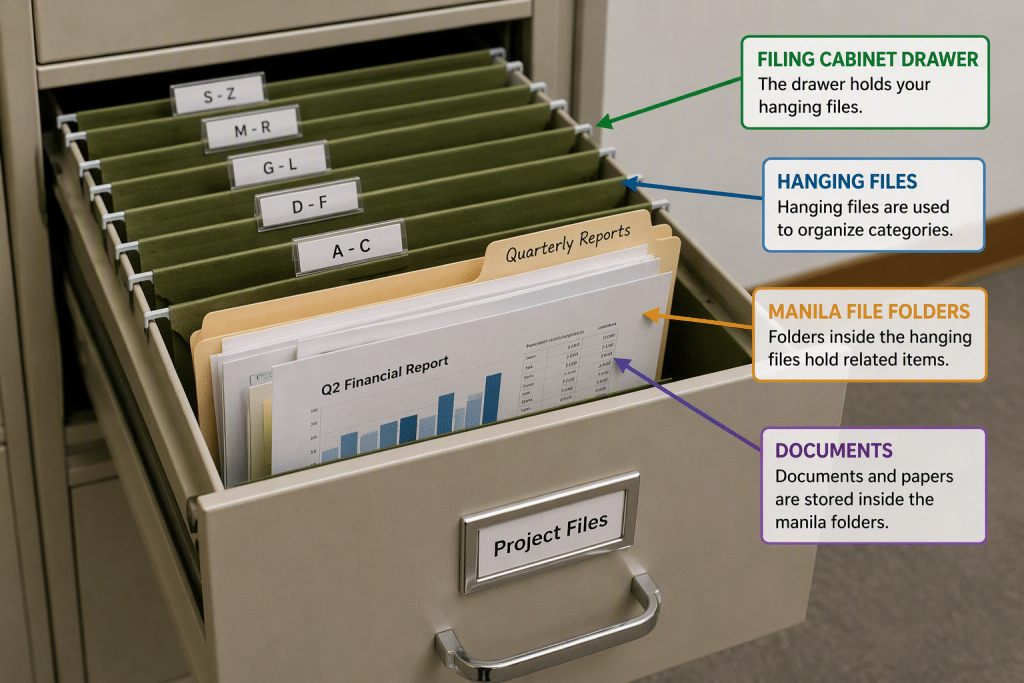
What is Windows 11? - A picture showing the filing system of Windows 11 by comparing it to a paper filing cabinet. The picture shows a large paper filing cabinet drawer containing hanging files within the drawer, manila file folders in the hanging files, and documents within the manila folders.

            In addition to managing the computer’s files, folders, hardware settings, and software applications, Windows has much more to offer. Windows comes preinstalled with software that includes basic text and image editing, as well as email and a web browser for Windows 11 called “Microsoft Edge.” You can also download many other useful personal and business apps for Windows 11, as needed.

How Do You Get Windows 11?

            This course will focus on using Windows 11. Many of the features discussed within this course are new changes to the Windows 11 operating system. You can download Windows 11 from Microsoft though Windows Update or the Microsoft website. Windows 11 is primarily distributed as a download. This makes it easier to update the software by using Windows Update as new improvements to its security and new features in Windows 11 become available.

What Are Windows “Builds”?

            Windows 11 is continually improved through updates that are released as new “builds.” A build is a specific version of the Windows operating system that includes a set of features, performance improvements, and security updates at a given point in time. Microsoft periodically releases new builds through Windows Update, which may include monthly updates, feature updates, or preview builds for testing new functionality. Each build is identified by a version and build number, which can help users and IT professionals determine which updates have been installed and what features are available.

What Else Does Windows 11 Do?

            Windows 11 provides more robust security features than previous versions of Windows. Windows 11 brings many of the features of Windows 10 and its desktop experience forward with it. Windows 11 also supports the mobile enhancements that were incorporated into previous versions. Windows 11 also provides users the flexibility to customize their experience to suit their personal tastes, regardless of the device, when using Windows 11 on desktops, laptops, and most tablets.

Tagged under: beginner windows tutorial, getting started with windows 11, how windows 11 works, introduction to windows 11, learn windows 11, Microsoft Windows 11, new to windows 11, what is windows 11, Windows 11, windows 11 basics, windows 11 desktop, windows 11 explained, windows 11 features, windows 11 for beginners, windows 11 help, windows 11 overview, windows 11 training, windows 11 tutorial, windows 11 user guide, windows 11 walkthrough, windows operating system

About Joseph Brownell

Joseph Brownell is founder and Vice President of TeachUcomp, Inc. He is the author of dozens of titles across the TeachUcomp, Inc. product line.
Team Training. Solutions for all team sizes.


Windows 11 Quick Reference Guide. Buy Now.
 

Categories

  • GET SOCIAL

© 2001-2026 Copyright TeachUcomp, Inc. All rights reserved.

TOP
25% Off Everything 4 Days 18 Hours 13 Minutes 9 Seconds      Coupon Code: SAVE25
Shop Now