
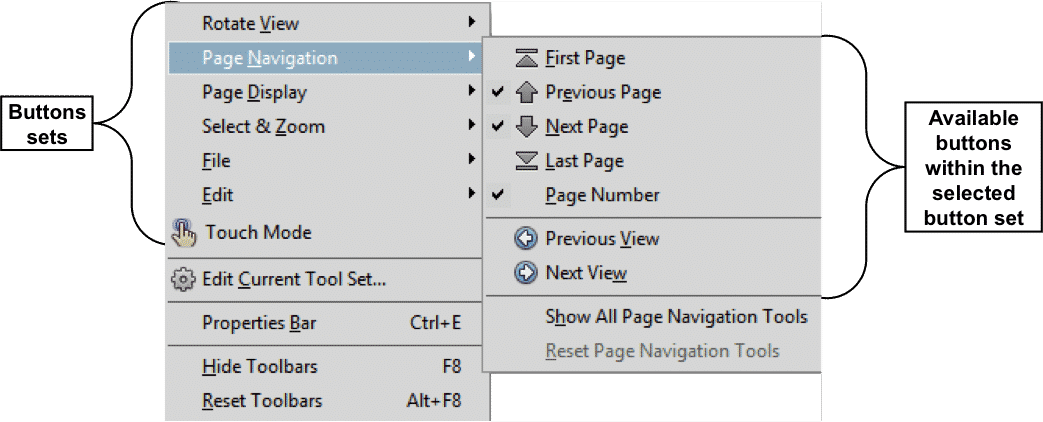
Customizing Toolbars in Acrobat XI Pro. A picture of the menu that appears when you right-click either toolbar anywhere except the “Quick Tools buttons” area in Acrobat XI Pro, or when you select “View| Show/Hide| Toolbar Items” from the Menu Bar. It displays the buttons sets in the menu and the available buttons shown within the selected button set.
- HOME
- PRODUCTS
- Books
- Manuals
- Reference Guides
- Adobe
- Chrome OS
- FreshBooks
- macOS
- Microsoft Office
- Excel Formulas and Functions
- Excel Keyboard Shortcuts (macOS)
- Excel Keyboard Shortcuts (PC/Windows)
- Excel Tables PivotTables and Charts
- Microsoft 365
- Microsoft Office 2021
- Microsoft Office 2019
- Microsoft Office 2016
- Microsoft Office 2013
- Microsoft Office for iPad
- Word Keyboard Shortcuts (macOS)
- Word Keyboard Shortcuts (PC/Windows)
- Microsoft Teams
- QuickBooks Online
- QuickBooks Pro
- Sage 50 Accounting
- SQL
- Windows
- Video Courses
- Shortcut Stickers
- SHOP BY TOPIC
- FOR TEAMS
- SUPPORT
- LOGIN

