
TeachUcomp, Inc.

 MY CART
  • VIDEO COURSES
    • All-Access Subscriptions
    • Business Licensing
    • Course List
      • Accounting
      • Adobe
        • Acrobat
        • Lightroom Classic
        • Photoshop
        • Photoshop Elements
      • Crystal Reports
      • Employment Skills
        • Interview Skills
        • Resume Skills
      • For Lawyers
        • Excel for Lawyers
        • Outlook for Lawyers
        • QuickBooks for Lawyers
        • Word for Lawyers
      • HTML
      • JavaScript
      • Microsoft Office
        • Access
        • Excel
        • Microsoft Office Suite
        • OneNote
        • Outlook
        • Outlook on the Web
        • PowerPoint
        • Publisher
        • Word
      • Microsoft Project
      • Microsoft Teams
      • QuickBooks Online
      • QuickBooks Pro
      • Sage
        • Peachtree
        • Sage 50
      • SQL
      • Windows
    • My Courses
    • Video Course Options
  • SUBSCRIPTIONS
  • MANUALS
    • Adobe
      • Acrobat
      • Lightroom Classic
      • Photoshop
      • Photoshop Elements
    • Crystal Reports
    • For Lawyers
      • Excel for Lawyers
      • Outlook for Lawyers
      • QuickBooks for Lawyers
      • Word for Lawyers
    • HTML
    • JavaScript
    • Microsoft Office
      • Access
      • Excel
      • OneNote
      • Outlook
      • Outlook on the Web
      • PowerPoint
      • Publisher
      • Word
    • Microsoft Project
    • Microsoft Teams
    • QuickBooks Online
    • QuickBooks Pro
    • Sage
      • Peachtree
      • Sage 50
    • SQL
    • Windows
  • BOOKS
    • QuickBooks Online
  • REFERENCE CARDS
    • Adobe
      • Acrobat
      • Lightroom Classic
      • Photoshop
      • Photoshop Elements 2026
      • Photoshop Elements 2025
      • Photoshop Elements 2024
      • Photoshop Elements 2023
      • Photoshop Elements 2022
      • Photoshop Elements 2021
      • Photoshop Elements 2020
      • Photoshop Elements 2019
      • Photoshop Elements 2018
      • Photoshop Elements 15
    • Chrome OS
      • Chrome OS Keyboard Shortcuts
    • FreshBooks
    • Google
      • Google Classroom for Teachers
      • Google Docs
      • Google Drive
      • Google Forms
      • Google Sheets
      • Google Slides
    • macOS
      • macOS Keyboard Shortcuts
      • macOS Tahoe
    • Microsoft Office
      • Excel Formulas and Functions
      • Excel Keyboard Shortcuts
      • Excel Tables PivotTables and Charts
      • Microsoft 365
        • Access for Microsoft 365
        • Excel for Microsoft 365
        • Microsoft Office 365
        • Outlook for Microsoft 365 Classic Edition
        • Outlook for Microsoft 365 (New Outlook)
        • PowerPoint for Microsoft 365
        • Publisher for Microsoft 365
        • Word for Microsoft 365
      • Microsoft Office 2021
        • Access 2021
        • Excel 2021
        • Microsoft Office 2021
        • OneNote for Windows 10
        • Outlook 2021
        • PowerPoint 2021
        • Publisher 2021
        • Word 2021
      • Microsoft Office 2019
        • Access 2019
        • Excel 2019
        • Microsoft Office 2019
        • Outlook 2019
        • PowerPoint 2019
        • Publisher 2019
        • Word 2019
      • Microsoft Office 2016
        • Access 2016
        • Excel 2016
        • Microsoft Office 2016
        • OneNote 2016
        • Outlook 2016
        • PowerPoint 2016
        • Publisher 2016
        • Word 2016
      • Microsoft Office 2013
        • Excel 2013
        • Microsoft Office 2013
        • OneNote 2013
        • Outlook 2013
        • PowerPoint 2013
        • Word 2013
      • Microsoft Office for iPad
        • Microsoft Office for iPad
      • Word Keyboard Shortcuts
    • Microsoft Teams
    • QuickBooks Online
    • QuickBooks Pro
      • QuickBooks Pro 2024
      • QuickBooks Pro 2023
      • QuickBooks Pro 2022
      • QuickBooks Pro 2021
      • QuickBooks Pro 2020
      • QuickBooks Pro 2019
      • QuickBooks Pro 2018
      • QuickBooks Pro 2017
      • QuickBooks Pro 2016
      • QuickBooks Pro 2015
      • QuickBooks Pro 2014
    • Sage 50 Accounting
    • SQL
    • Windows
      • Windows 11
      • Windows 11 and 10 Keyboard Shortcuts
      • Windows 10
  • STICKERS
    • Chrome OS
    • macOS
    • Microsoft Office
      • Word and Excel (Mac)
      • Word and Excel (PC/Windows)
    • QuickBooks Desktop
      • QuickBooks Desktop (PC/Windows) 2024
      • QuickBooks Desktop (PC/Windows) 2023
      • QuickBooks Desktop (PC/Windows) 2022-2015
    • Windows
  • SUPPORT
    • Company
      • About Us
      • Blog
      • Contact Us
      • Our History
      • Our Philosophy
        • Customer Service
        • Mission
      • Policies
      • Testimonials
    • FAQ
      • Contact Us
    • Help
    • Lost Password
    • Register a Product
  • LOGIN
    • Manage My Account
    • Member Login
    • My Courses
Shop Now

Microsoft Officially Launches Windows 8.1

by Keeley Byrnes / Friday, June 28 2013 / Published in Latest, Microsoft, News

This week, Microsoft officially launched a preview of Windows 8.1 to the public during its annual developer’s conference. While Microsoft showed some of the changes at Computex last month, this is the first official launch of the update. The free test version is available for download, with the full version to be released later in the year.


Return of the “Start” Button

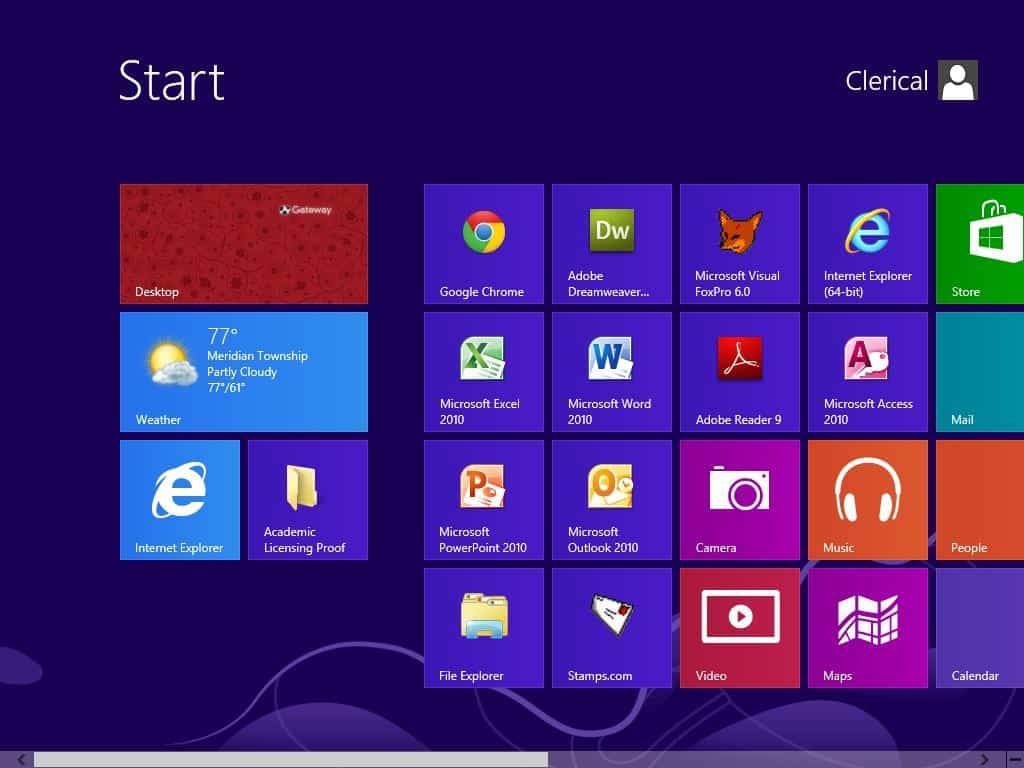
One of the biggest changes in this update is the return of the “Start” button in Windows. This became a controversy for Microsoft since they took away the button in Windows 8. The company’s reasoning for this, was to make Windows 8 appear similar on all platforms- PC, mobile, and tablets. It was also to integrate apps and attract app developers. Microsoft was criticized for this new start screen in Windows 8, which replaced the “start” button with tile-like features- instead of the traditional PC menu. This change confused long-time users of the operating system and caused a slower than expected change to the new software.

Microsoft CEO Steve Ballmer confirmed its return by stating, “Let’s make it easier to start applications in the way we are used to.  We will bring back the start button, and you can boot straight to the desktop if you want to.” He followed up by saying, “We have refined the blend of our desktop experience and our modern app experience.”

While the return of the start button is a return to a more traditional Windows platform, the new software is still app friendly. This has helped customers ease into the change. It allows users to easily see a list of their apps simply by swiping up on the screen (for touch screen devices). The new Windows 8.1 also includes an improved “search” feature, which lets users search for apps, documents, or items on the internet- all in one search bar.

At the developer’s conference, Julie Larson-Green (head of Windows at Microsoft) showed off a tablet running Windows 8.1. It has new features that make it easier for touch based devices. “This update shows how much more responsive our engineering has become,” she stated. “We have had over 800 updates to Windows 8 since we launched it.” Larson-Green showed off a range of touchscreen PCs running Windows 8.1. She showed new sliding techniques that allow users to slide along the screen’s space bar to select items from the main menu. “Pretty much every screen you own is going to be touch,” she said.


Other New Features

Microsoft has built direct support for 3D printers and even Lego robotic kits into Windows 8.1. Larson-Green also showed off a redesigned Xbox Music app that is integrated into all versions of Windows 8. This app is a music-streaming service which allows Microsoft to compete with other music-streaming companies. It allows users to stream and buy music from anywhere in Windows.

Windows 8.1 aims to let users customize the start screen by changing the size of app icon titles or controlling which apps appear. Ballmer also promised the company would continue to tweak the software to make it more customize-able and user friendly. Microsoft’s latest internet browser, Internet Explorer 11 is also included with Windows 8.1


Moving Forward

Microsoft has sold more than 100 million Windows 8 licenses since October. However, the company must keep up with changing markets. PCs sales are dwindling and tablets are on the rise. Also, heavy competition with companies such as Apple has forced Microsoft to be innovative and push for technologies that can integrate the use of apps. Microsoft’s Surface has taken less than 2 percent of the tablet market. In order to stay competitive, Microsoft has been forced to stay away from the traditional PC model and create newer software that can be used on Tablets and other touch devices. But while touch-screen users tend to enjoy the new tile based interface, many traditional users complained about the new design being confusing. Balancing innovation while keeping loyal users happy will be a challenge for Microsoft in the future. For now, it seems as if Windows 8.1 is a great balance between a new interface and the traditional “start” menu that past users are accustomed to.

Tagged under: microsoft, Microsoft Office, microsoft windows, mobile, new, pc, release, start button, start screen, touch screen, Windows, windows 8, Windows 8.1

About Keeley Byrnes

Keeley is our Director of Marketing and has been with TeachUcomp since 2010. Keeley manages all aspects of our Marketing Department, acts as liaison for our reseller and affiliate partners and also authors courses in software and taxation.
Sale! One Year Online Entire Library $29. Click here to see the deals.


Categories

  • GET SOCIAL

© 2001-2026 Copyright TeachUcomp, Inc. All rights reserved.

TOP
SALE! $29 All-Access 6 Days 12 Hours 44 Minutes 37 Seconds      $199 $29 Entire Library!
See Deal