
 MY CART
What Is Windows 11 and Why Do People Use It? – Video Lesson
This video lesson, titled “What Is Windows 11 and Why Do People Use It? – A Windows 11 Training Tutorial,” shows you what Windows 11 is and why people use it. This video lesson is from our complete Windows tutorial, titled “Mastering Windows Online Made Easy.”
Overview:
What is Windows 11?
Windows is a family of operating systems developed by Microsoft Corporation. Windows provides a graphical user interface (GUI), virtual memory management, multitasking, and support for many peripheral devices.
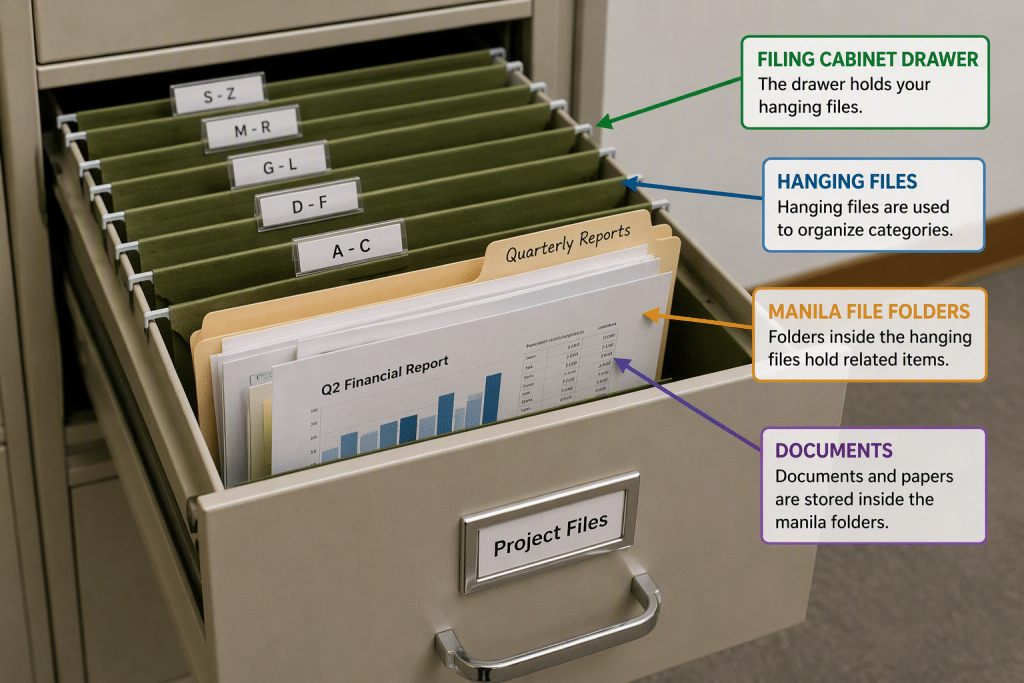
Windows helps you organize all the files and programs within your computer. For new users, one way to think of the file management aspect of Windows is to think of a large paper filing cabinet. Within the filing cabinet, there are hanging files labeled in a logical order. Within those hanging files, there are manila file folders that contain documents. Windows allows you to accomplish the same document filing system in an electronic format. You can open, sort, move, print, rename, find or delete files easily by using Windows.
In addition to managing the computer’s files, folders, hardware settings, and software applications, Windows has much more to offer. Windows comes preinstalled with software that includes basic text and image editing, as well as email and a web browser for Windows 11 called “Microsoft Edge.” You can also download many other useful personal and business apps for Windows 11, as needed.
How Do You Get Windows 11?
This course will focus on using Windows 11. Many of the features discussed within this course are new changes to the Windows 11 operating system. You can download Windows 11 from Microsoft though Windows Update or the Microsoft website. Windows 11 is primarily distributed as a download. This makes it easier to update the software by using Windows Update as new improvements to its security and new features in Windows 11 become available.
What Are Windows “Builds”?
Windows 11 is continually improved through updates that are released as new “builds.” A build is a specific version of the Windows operating system that includes a set of features, performance improvements, and security updates at a given point in time. Microsoft periodically releases new builds through Windows Update, which may include monthly updates, feature updates, or preview builds for testing new functionality. Each build is identified by a version and build number, which can help users and IT professionals determine which updates have been installed and what features are available.
What Else Does Windows 11 Do?
Windows 11 provides more robust security features than previous versions of Windows. Windows 11 brings many of the features of Windows 10 and its desktop experience forward with it. Windows 11 also supports the mobile enhancements that were incorporated into previous versions. Windows 11 also provides users the flexibility to customize their experience to suit their personal tastes, regardless of the device, when using Windows 11 on desktops, laptops, and most tablets.
