MY CART
Adobe Dreamweaver Training Course 


| Course Title: | Mastering Dreamweaver Made Easy |
|---|---|
| Versions Covered: | CS5, CS4 & CS3 |
| Hours of Content: | 6 |
| Video Lessons: | 130 |
| Manuals: | 2 (Introductory & Advanced) |
| Download/DVD-ROM: | Standard: $40 | CPE: $50 | Buy |
| Online: | Access to ALL Courses. One low price. | Info |
| Multi-User: | Need to train multiple people? |  |
| CPE Credits: | 7 |
Course Description
Learn Adobe Dreamweaver with this comprehensive course from TeachUcomp, Inc. Mastering Dreamweaver Made Easy features 130 video lessons with over 6 hours of introductory through advanced instruction. Watch, listen and learn as your expert instructor guides you through each lesson step-by-step. During this media-rich learning experience, you will see each function performed just as if your instructor were there with you. Reinforce your learning with the text of our two printable classroom instruction manuals (Introductory and Advanced), additional images and practice exercises. You will learn how to create a website from scratch, while exploring all of the techniques to add the various elements of a website – text, links, images, CSS and much more.
Whether you are completely new to Dreamweaver or upgrading from an older version, this course will empower you with the knowledge and skills necessary to be a proficient user. We have incorporated years of classroom training experience and teaching techniques to develop an easy-to-use course that you can customize to meet your personal learning needs. Simply launch the easy-to-use interface, click to start a video lesson or open one of the manuals and you’re on your way to mastering Dreamweaver.
Course Syllabus & Sample Lessons
Select any of the video lessons marked to view them in a new window.
To view a sample of the instruction manuals in PDF, click here: Introductory Dreamweaver | Advanced Dreamweaver
| CHAPTER 1- | Getting Acquainted with Dreamweaver | |
| Lesson 1.1- | The Dreamweaver Environment | |
| Lesson 1.2- | The Designer Workspace | |
| Lesson 1.3- | The Menu Bar | |
| Lesson 1.4- | The Designer View Icons | |
| Lesson 1.5- | The Designer View Toolbar | |
| Lesson 1.6- | Working With Panels | |
| Lesson 1.7- | The Properties Inspector | |
| Lesson 1.8- | The Insert Panel | |
| Lesson 1.9- | Other Common Panels | |
| CHAPTER 2- | Creating a Website | |
| Lesson 2.1- | About New Websites | |
| Lesson 2.2- | The Root Folder | |
| Lesson 2.3- | Defining a Website | |
| Lesson 2.4- | Creating a New Web Page | |
| Lesson 2.5- | Saving and Closing Web Pages | |
| Lesson 2.6- | Opening Saved Web Pages | |
| Lesson 2.7- | Previewing Web Pages | |
| Lesson 2.8- | Multi-Browser Previews | |
| CHAPTER 3- | All About Text | |
| Lesson 3.1- | Working With Text | |
| Lesson 3.2- | Exploring Heading Levels | |
| Lesson 3.3- | Formatting Text Color | |
| Lesson 3.4- | Changing a Web Page’s Background Color | |
| Lesson 3.5- | Aligning Text | |
| Lesson 3.6- | Creating Paragraphs | |
| Lesson 3.7- | Working With Fonts | |
| Lesson 3.8- | Using Custom Fonts | |
| Lesson 3.9- | Using Bold and Italics With Text | |
| Lesson 3.10- | Creating Lists | |
| Lesson 3.11- | Special Characters | |
| Lesson 3.12- | Creating Block Quotes | |
| CHAPTER 4- | All About Images | |
| Lesson 4.1- | Using Images in a Web Page | |
| Lesson 4.2- | Image File Types | |
| Lesson 4.3- | Commonly Used Web Images | |
| Lesson 4.4- | Inserting Images Into a Web Page | |
| Lesson 4.5- | Image Properties | |
| Lesson 4.6- | Borders and Spacing Around Images | |
| Lesson 4.7- | Using Background Images | |
| Lesson 4.8- | Resizing Images | |
| Lesson 4.9- | Cropping Images | |
| Lesson 4.10- | Using Images and Text Together | |
| Lesson 4.11- | When to Use Outside Imaging Programs | |
| Lesson 4.12- | Opening an Image in Adobe Photoshop | |
| Lesson 4.13- | Cropping an Image Using Photoshop | |
| Lesson 4.14- | Saving an Image Using Photoshop | |
| Lesson 4.15- | Resizing an Image Using Photoshop | |
| Lesson 4.16- | Working with Custom Fonts in Photoshop | |
| CHAPTER 5- | All About Hyperlinks | |
| Lesson 5.1- | Inserting a Hyperlink Into a Web Page | |
| Lesson 5.2- | Turning Images Into Hyperlinks | |
| Lesson 5.3- | Creating Image Maps | |
| Lesson 5.4- | Named Anchor Links | |
| Lesson 5.5- | Adding an Email Link to a Web Page | |
| Lesson 5.6- | Changing the Appearance of Hyperlinks | |
| CHAPTER 6- | Using Frames | |
| Lesson 6.1- | Using Frames | |
| Lesson 6.2- | Adding Content to Frames | |
| Lesson 6.3- | Naming Frames | |
| Lesson 6.4- | Deleting Frames | |
| Lesson 6.5- | Linking to Frames | |
| CHAPTER 7- | Tables | |
| Lesson 7.1- | When to Use Tables | |
| Lesson 7.2- | Creating Tables | |
| Lesson 7.3- | Inserting and Editing Content in Tables | |
| Lesson 7.4- | Editing Rows and Columns | |
| Lesson 7.5- | Table Borders and Backgrounds | |
| Lesson 7.6- | Spacing and Padding in Table Cells | |
| Lesson 7.7- | Merging and Splitting Table Cells | |
| CHAPTER 8- | CSS Basics | |
| Lesson 8.1- | Working with Cascading Style Sheets | |
| Lesson 8.2- | Editing CSS Styles | |
| Lesson 8.3- | Creating Class Styles | |
| Lesson 8.4- | Applying Class Styles | |
| Lesson 8.5- | Editing Class Styles | |
| Lesson 8.6- | Customizing HTML Tags | |
| Lesson 8.7- | Modifying Fonts Using CSS | |
| CHAPTER 9- | CSS Layouts and AP Divs | |
| Lesson 9.1- | Creating External Style Sheets | |
| Lesson 9.2- | Attaching External Style Sheets | |
| Lesson 9.3- | Editing an External Style Sheet | |
| Lesson 9.4- | Absolute Positioning Versus Relative Positioning | |
| Lesson 9.5- | About AP Divs | |
| Lesson 9.6- | Nested AP Divs | |
| Lesson 9.7- | Designing a Web Page Using CSS Layouts | |
| Lesson 9.8- | Editing CSS Layouts | |
| Lesson 9.9- | Inserting an Image Into a Header | |
| Lesson 9.10- | Adding Images to a CSS Layout | |
| CHAPTER 10- | Spry Widgets & Forms | |
| Lesson 10.1- | Spry Widgets, Behavior Events and Actions | |
| Lesson 10.2- | Creating a Drop-Down Menu | |
| Lesson 10.3- | Editing a Drop-Down Menu | |
| Lesson 10.4- | Creating Tabbed Panels | |
| Lesson 10.5- | Adding Content to Tabbed Panels | |
| Lesson 10.6- | Editing Tabbed Panels | |
| Lesson 10.7- | Open Browser Window Behavior | |
| Lesson 10.8- | About Forms | |
| Lesson 10.9- | Adding Text Fields to Forms | |
| Lesson 10.10- | Inserting Checkboxes Into Forms | |
| Lesson 10.11- | Inserting Radio Buttons Into Forms | |
| Lesson 10.12- | Inserting Lists and Menus Into Forms | |
| Lesson 10.13- | Adding Buttons to Forms | |
| CHAPTER 11- | Publishing Your Website | |
| Lesson 11.1- | Domain Names Versus Web Hosting | |
| Lesson 11.2- | When is my site ready to publish? | |
| Lesson 11.3- | Setting Up a Remote Site | |
| Lesson 11.4- | Connecting to a Remote Server | |
| Lesson 11.5- | Putting Files on the Remote Site | |
| Lesson 11.6- | Canceling Uploads and Deleting Remote Site Files | |
| Lesson 11.7- | Downloading Files from the Remote Site | |
| CHAPTER 12- | Website Management | |
| Lesson 12.1- | Site Assets | |
| Lesson 12.2- | Changing Links Site-Wide | |
| Lesson 12.3- | Finding and Replacing Text | |
| Lesson 12.4- | Site Reports | |
| Lesson 12.5- | Checking Files In and Out | |
| Lesson 12.6- | Using Design Notes | |
| CHAPTER 13- | Adobe Bridge | |
| Lesson 13.1- | The Adobe Bridge Environment | |
| Lesson 13.2- | Display Options | |
| Lesson 13.3- | Compact Mode | |
| Lesson 13.4- | Navigating, Opening & Placing Files | |
| Lesson 13.5- | Searching for Files and Folders | |
| Lesson 13.6- | Labeling and Rating Files | |
| Lesson 13.7- | Sorting and Filtering Files | |
| Lesson 13.8- | Copying, Moving and Deleting Files | |
| Lesson 13.9- | Stacking and Unstacking | |
| Lesson 13.10- | Previewing Images and the Loupe Tool | |
| Lesson 13.11- | Rotating Images | |
| Lesson 13.12- | Viewing a Slideshow | |
| Lesson 13.13- | Viewing and Editing Metadata | |
| Lesson 13.14- | Keywords |
Adobe Dreamweaver Training Course Overview
Dreamweaver is Adobe‘s popular web design software. During this 6 hour Dreamweaver video training course, our expert instructor will show you how to create a website from scratch, while exploring all of the techniques to add the various elements of a website – text, links, images, CSS and much more. This Dreamweaver tutorial covers the same material as our two-day classroom training and was designed to provide a solid foundation in Dreamweaver.
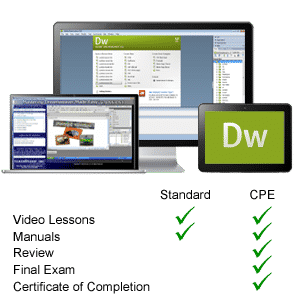
We offer two types of Dreamweaver courses – Standard and CPE (Continuing Professional Education). The Standard training course includes all video lessons and printable classroom instruction manuals. The CPE edition includes the same training curriculum, plus a practice exam with evaluative feedback (find out why your answers are right or wrong), your final exam submission and a course certificate of completion.
At TeachUcomp, Inc., you choose how you want your Dreamweaver training delivered.
Online subscriptions offer the most flexibility and value. With online training, you can access your courses anytime and anywhere you have an internet connection (including all new releases and updates). Your subscription grants you instant access to ALL of our courses for one low price. There are no contracts and you can cancel at any time. You may choose between a monthly or annual plan.
Courses are also available individually via digital download or DVD-ROM for a one-time charge.