MY CART
Credit Card Credit in QuickBooks Online- Instructions
Creating a Credit Card Credit in QuickBooks Online: Video
This video lesson, titled “How to Enter Credit Card Credits in QuickBooks Online,” shows you how to create a credit card credit in QuickBooks Online. This video lesson is from our complete QuickBooks Online tutorial, titled “Mastering QuickBooks Online Made Easy.”
Overview:
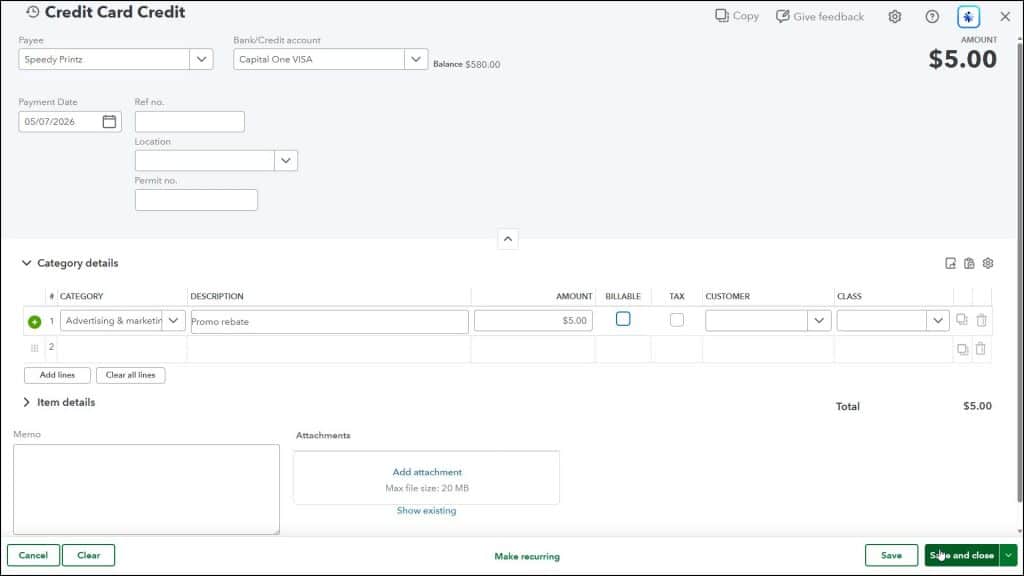
You create a credit card credit in QuickBooks Online to record a return to a business credit card. To enter a credit card credit in QuickBooks Online, hover over the “+ Create” button in the Navigation Bar. Then click the “Credit Card Credit” link under the “Vendors” heading in the menu that appears to open the “Credit Card Credit” window. Select the vendor from whom you made the purchase by using the “Payee” drop-down. Select the credit card account you used from the “Bank/Credit account” drop-down.
Then enter the appropriate “Category details” or “Item details,” depending for which account or items you are being credited. Make sure to enter the same account or item information as when you paid the original expense or paid the bill using the credit card, to correctly reflect the credit to the related account or accounts.
When finished, click the “Save and close” button to save the credit card credit and close the page. Alternatively, to enter another “Credit Card Credit” instead, select the “Save and new” choice from the drop-down button to save the current transaction and open a new blank “Credit Card Credit” window.