MY CART
Equity Accounts in QuickBooks Online
Learn about Equity Accounts in QuickBooks Online: Video
This video lesson, titled “Learn about Equity Accounts in QuickBooks Online,” discusses the default equity accounts that appear in the chart of accounts in QuickBooks Online. This video lesson is from our complete QuickBooks Online tutorial, titled “Mastering QuickBooks Online Made Easy.”
Overview:
Equity is basically the difference between what you have (your assets) and what you owe (your liabilities). If you sold all your assets today and paid off all your liabilities using the money received from the sale of your assets, the money left over would be equity.
A balance sheet shows your company assets, liabilities, and equity on a particular date. Because equity is the difference between total assets and total liabilities, it’s also true that total assets equal the sum of total liabilities and equity.
As you enter the opening balances of your assets and liabilities while creating the company file, QuickBooks Online calculates the amount of equity and records it in an equity account called Opening balance equity. In addition to the “Opening balance equity” account, QuickBooks Online sets up another type of equity account for you called Retained Earnings. This account tracks your company’s net income from previous fiscal years. QuickBooks Online automatically transfers your profit (or loss) to Retained Earnings at the end of each fiscal year.
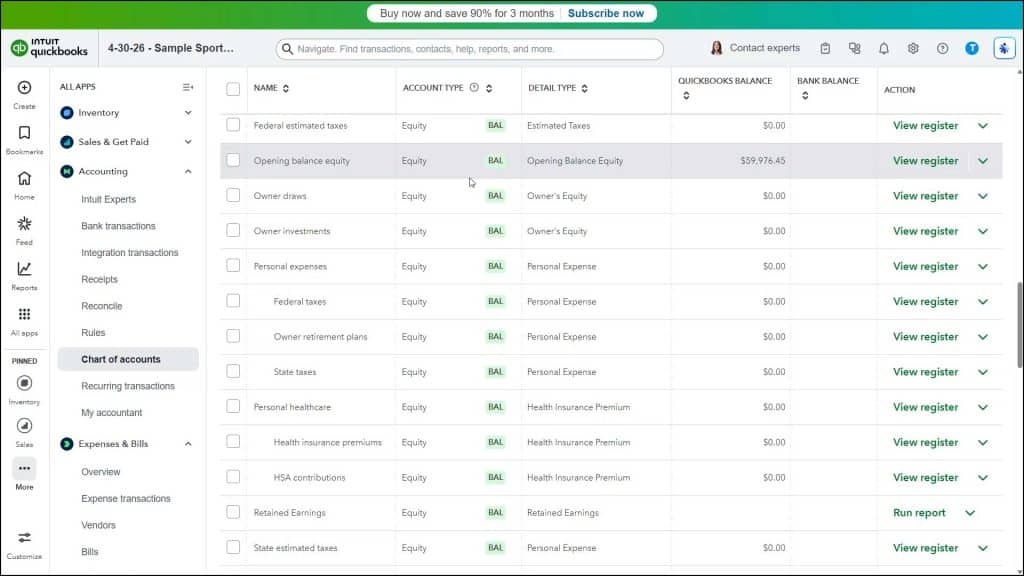
If your company is a sole proprietorship, you don’t have to add any more equity accounts to your chart of accounts. All the equity belongs to the company’s sole owner. If your business is a partnership, you’ll probably want to set up separate equity accounts for each partner.
You will want to create a new “Vendor” record for each owner or partner to make it easier to record their equity transactions. You may also want to create a user account for each owner or partner. However, depending on the number of users available in QuickBooks Online, this may not be a viable option.