
 MY CART
Introducing the Chromebook Keyboard Shortcuts Quick Reference Guide: Your Essential Productivity Companion
If you’ve ever wished you could work faster, navigate more intuitively, and unlock the full potential of your Chromebook, our brand‑new Chromebook Keyboard Shortcuts Quick Reference Guide is exactly what you’ve been waiting for. Designed for busy professionals, students, educators, and anyone looking to streamline their workflow, this two‑page guide puts 167 essential Chromebook keyboard shortcuts right at your fingertips.
This beautifully designed reference card offers a clean, easy‑to‑use layout that makes finding the shortcut you need quick and effortless. At just 8.5 x 11 inches and available in both laminated physical format and downloadable PDF, it’s built to suit any workspace—from office desks to classroom learning stations.
Why Choose the Chromebook Keyboard Shortcuts Quick Reference Guide?
Chrome OS offers an impressive number of shortcuts, but discovering and remembering them all can be overwhelming. That’s where our guide comes in. It compiles the most important and productivity‑boosting keys into one streamlined, accessible tool. With shortcuts covering everything from browser navigation and system controls to accessibility features like ChromeVox, users can dramatically cut down on clicks and menu‑hunting.
Keyboard shortcuts aren’t just time‑savers—they’re game changers. Whether you’re switching between apps, managing tabs, capturing screenshots, or controlling display functions, mastering shortcuts helps you stay focused and efficient. The Chromebook Keyboard Shortcuts Quick Reference Guide ensures you always have the right combination within reach.
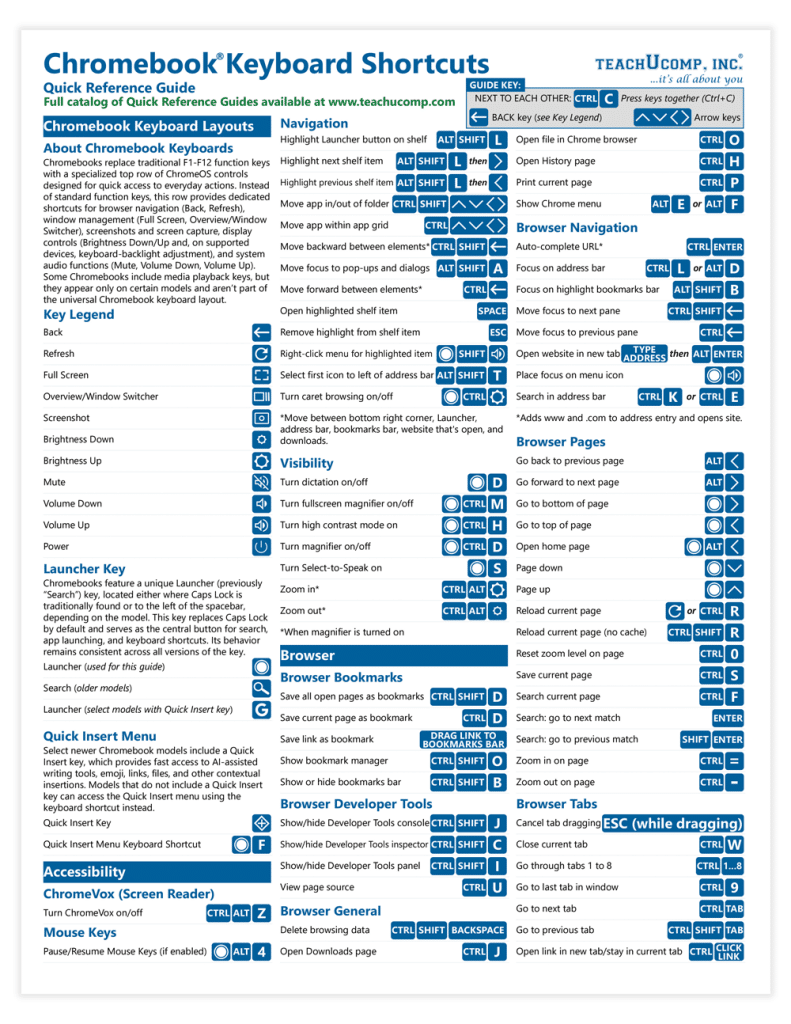
Chrome OS for Chromebook Keyboard Shortcuts Quick Reference Guide
Packed With High‑Value Features
Here’s just a glimpse of what this power‑packed guide covers:
- Quick Insert and Accessibility commands
- ChromeVox and dictation toggles
- Touchpad and navigation shortcuts
- Bookmarking, page management, and browsing tools
- Tab control for multitaskers
- Display and device settings management
All shortcuts are categorized clearly, making it easy to scan and find exactly what you need.
Perfect for Individuals, Teams, and Training Programs
Whether you’re equipping a classroom, onboarding employees, or enhancing your own productivity, this guide is a cost‑effective, high‑impact tool. Printed versions are laminated for durability, while the downloadable PDF offers instant access. Volume discounts make bulk purchasing even more affordable.
Ready to work smarter—not harder?
Explore or order the Chromebook Keyboard Shortcuts Quick Reference Guide today: Chromebook Keyboard Shortcuts Quick Reference Guide
