
TeachUcomp, Inc.

 MY CART
  • VIDEO COURSES
    • All-Access Subscriptions
    • Business Licensing
    • Course List
      • Accounting
      • Adobe
        • Acrobat
        • Lightroom Classic
        • Photoshop
        • Photoshop Elements
      • Crystal Reports
      • Employment Skills
        • Interview Skills
        • Resume Skills
      • For Lawyers
        • Excel for Lawyers
        • Outlook for Lawyers
        • QuickBooks for Lawyers
        • Word for Lawyers
      • HTML
      • JavaScript
      • Microsoft Office
        • Access
        • Excel
        • Microsoft Office Suite
        • OneNote
        • Outlook
        • Outlook on the Web
        • PowerPoint
        • Publisher
        • Word
      • Microsoft Project
      • Microsoft Teams
      • QuickBooks Online
      • QuickBooks Pro
      • Sage
        • Peachtree
        • Sage 50
      • SQL
      • Windows
    • My Courses
    • Video Course Options
  • SUBSCRIPTIONS
  • MANUALS
    • Adobe
      • Acrobat
      • Lightroom Classic
      • Photoshop
      • Photoshop Elements
    • Crystal Reports
    • For Lawyers
      • Excel for Lawyers
      • Outlook for Lawyers
      • QuickBooks for Lawyers
      • Word for Lawyers
    • HTML
    • JavaScript
    • Microsoft Office
      • Access
      • Excel
      • OneNote
      • Outlook
      • Outlook on the Web
      • PowerPoint
      • Publisher
      • Word
    • Microsoft Project
    • Microsoft Teams
    • QuickBooks Online
    • QuickBooks Pro
    • Sage
      • Peachtree
      • Sage 50
    • SQL
    • Windows
  • BOOKS
    • QuickBooks Online
  • REFERENCE CARDS
    • Adobe
      • Acrobat
      • Lightroom Classic
      • Photoshop
      • Photoshop Elements 2026
      • Photoshop Elements 2025
      • Photoshop Elements 2024
      • Photoshop Elements 2023
      • Photoshop Elements 2022
      • Photoshop Elements 2021
      • Photoshop Elements 2020
      • Photoshop Elements 2019
      • Photoshop Elements 2018
      • Photoshop Elements 15
    • FreshBooks
    • Google
      • Google Classroom for Teachers
      • Google Docs
      • Google Drive
      • Google Forms
      • Google Sheets
      • Google Slides
    • macOS
      • macOS Keyboard Shortcuts
      • macOS Tahoe
    • Microsoft Office
      • Excel Formulas and Functions
      • Excel Keyboard Shortcuts
      • Excel Tables PivotTables and Charts
      • Microsoft 365
        • Access for Microsoft 365
        • Excel for Microsoft 365
        • Microsoft Office 365
        • Outlook for Microsoft 365 Classic Edition
        • Outlook for Microsoft 365 (New Outlook)
        • PowerPoint for Microsoft 365
        • Publisher for Microsoft 365
        • Word for Microsoft 365
      • Microsoft Office 2021
        • Access 2021
        • Excel 2021
        • Microsoft Office 2021
        • OneNote for Windows 10
        • Outlook 2021
        • PowerPoint 2021
        • Publisher 2021
        • Word 2021
      • Microsoft Office 2019
        • Access 2019
        • Excel 2019
        • Microsoft Office 2019
        • Outlook 2019
        • PowerPoint 2019
        • Publisher 2019
        • Word 2019
      • Microsoft Office 2016
        • Access 2016
        • Excel 2016
        • Microsoft Office 2016
        • OneNote 2016
        • Outlook 2016
        • PowerPoint 2016
        • Publisher 2016
        • Word 2016
      • Microsoft Office 2013
        • Excel 2013
        • Microsoft Office 2013
        • OneNote 2013
        • Outlook 2013
        • PowerPoint 2013
        • Word 2013
      • Microsoft Office for iPad
        • Microsoft Office for iPad
      • Word Keyboard Shortcuts
    • Microsoft Teams
    • QuickBooks Online
    • QuickBooks Pro
      • QuickBooks Pro 2024
      • QuickBooks Pro 2023
      • QuickBooks Pro 2022
      • QuickBooks Pro 2021
      • QuickBooks Pro 2020
      • QuickBooks Pro 2019
      • QuickBooks Pro 2018
      • QuickBooks Pro 2017
      • QuickBooks Pro 2016
      • QuickBooks Pro 2015
      • QuickBooks Pro 2014
    • Sage 50 Accounting
    • SQL
    • Windows
      • Windows 11
      • Windows 11 and 10 Keyboard Shortcuts
      • Windows 10
  • SUPPORT
    • Company
      • About Us
      • Blog
      • Contact Us
      • Our History
      • Our Philosophy
        • Customer Service
        • Mission
      • Policies
      • Testimonials
    • FAQ
      • Contact Us
    • Help
    • Lost Password
    • Register a Product
  • LOGIN
    • Manage My Account
    • Member Login
    • My Courses
Shop Now

WordPress Tutorial Now Available

by Joseph Brownell / Tuesday, September 30 2014 / Published in Latest, What's New at TeachUcomp?, WordPress
A picture of the WordPress tutorial interface for

Learn WordPress with the New WordPress Tutorial from TeachUcomp, Inc.

            TeachUcomp, Inc. is pleased to announce the release of our new WordPress tutorial, “Mastering WordPress Made Easy v.4.0.” This WordPress tutorial offers five hours of WordPress training in 71 video lessons. It also includes a 137-page manual with lesson transcripts, step-by-step instructions, exercises, and keyboard shortcuts. This WordPress tutorial covers material within WordPress as of version 4.0. For students interested in completing review and testing materials on the course, the Continuing Professional Education (CPE) version of the course, titled “Mastering WordPress Made Easy v.4.0 CPE Edition v.1.0” is also available. The CPE Edition of this WordPress training includes all of the same materials found in the standard version, along with a practice exam for course review, and final exam.

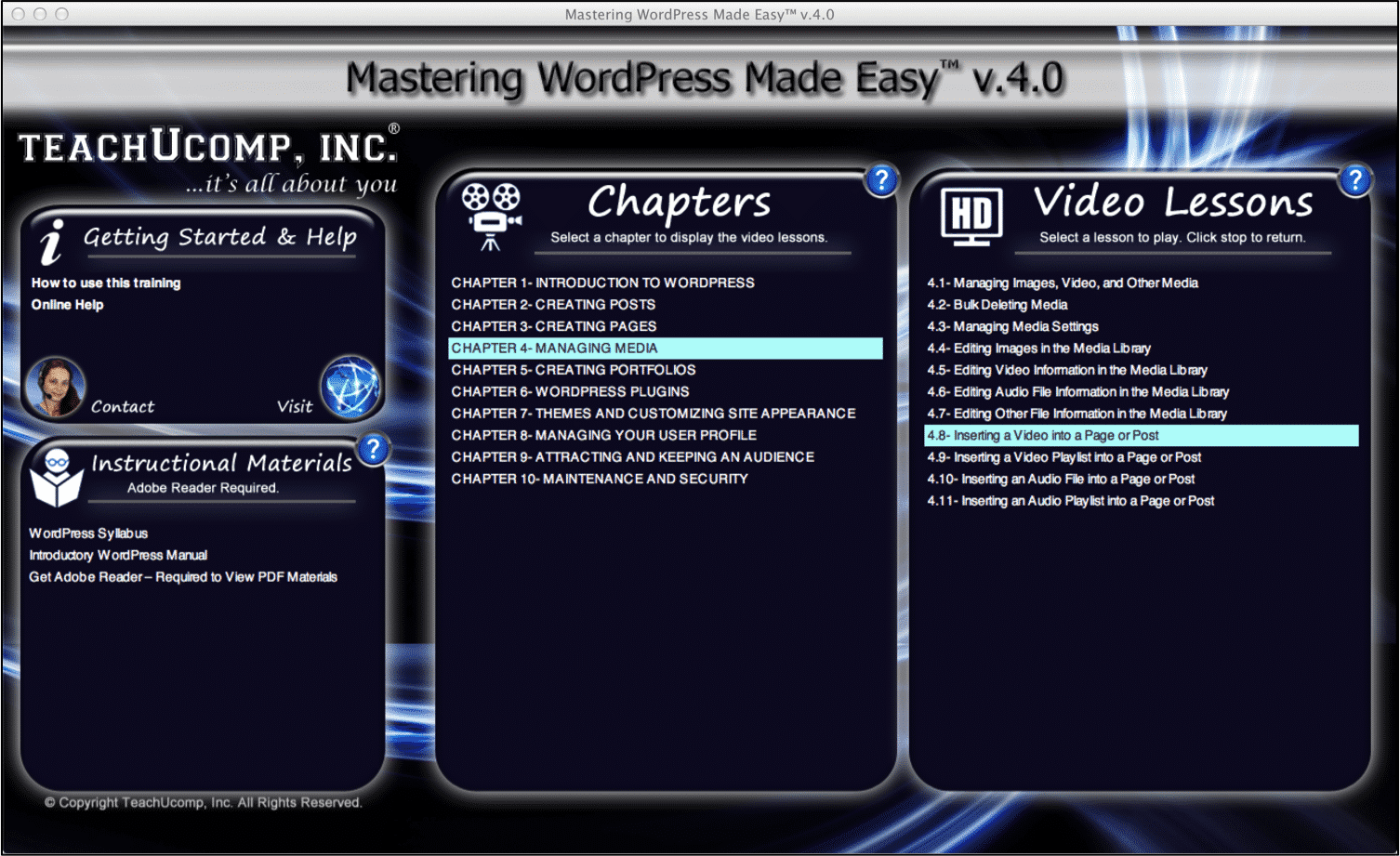
A picture of the WordPress tutorial interface for "Mastering WordPress Made Easy v.4.0."

WordPress Tutorial: Course Description

            This WordPress tutorial introduces the student to the self-hosted version of WordPress, which you can download from WordPress.org. The course teaches you how to maximize the powerful features of the program to create an amazing blog or website. You will learn how to setup WordPress, manage media (including video and audio files), create dynamic content, attract visitors, and much more. The course includes ten chapters on the following topics shown in the list below.

CHAPTER 1 Introduction to WordPress
CHAPTER 2 Creating Posts
CHAPTER 3 Creating Pages
CHAPTER 4 Managing Media
CHAPTER 5 Creating Portfolios
CHAPTER 6 WordPress Plugins
CHAPTER 7 Themes and Customizing Site Appearance
CHAPTER 8 Managing Your User Profile
CHAPTER 9 Attracting and Keeping An Audience
CHAPTER 10 Maintenance and Security

WordPress Tutorial: How to Purchase

            You can purchase this WordPress tutorial directly from TeachUcomp, Inc. You can choose whether you want the training provided as online training, a digital download, or a DVD-ROM. You can also select either the “Standard” (training only) or “CPE” (training plus testing) version of the course. You can find this information, plus additional course information, at the following product page for “Mastering WordPress Made Easy v.4.0.”

Tagged under: course, how-to, instructions, learn, lesson, teach, training, tutorial, video, wordpress, WordPress tutorial

About Joseph Brownell

Joseph Brownell is founder and Vice President of TeachUcomp, Inc. He is the author of dozens of titles across the TeachUcomp, Inc. product line.
Sale! One Year Online Entire Library $29. Click here to see the deals.


Categories

  • GET SOCIAL

© 2001-2026 Copyright TeachUcomp, Inc. All rights reserved.

TOP
SALE! $29 All-Access 4 Days 1 Hours 8 Minutes 58 Seconds      $199 $29 Entire Library!
See Deal