MY CART
How to Sign Out of QuickBooks Online
How to Sign Out of QuickBooks Online: Video
This video lesson, titled “How to Sign Out of QuickBooks Online,” shows you how to sign out of QuickBooks Online. This video lesson is from our complete QuickBooks Online tutorial, titled “Mastering QuickBooks Online Made Easy.”
Overview:
To sign out of QuickBooks Online, click the “User” button in the upper-right corner of the screen. Then click the “Sign Out” button in the drop-down menu. Also, note you can click the “Manage your Intuit Account” link in the menu to open a web page that lets you change account settings, if needed.
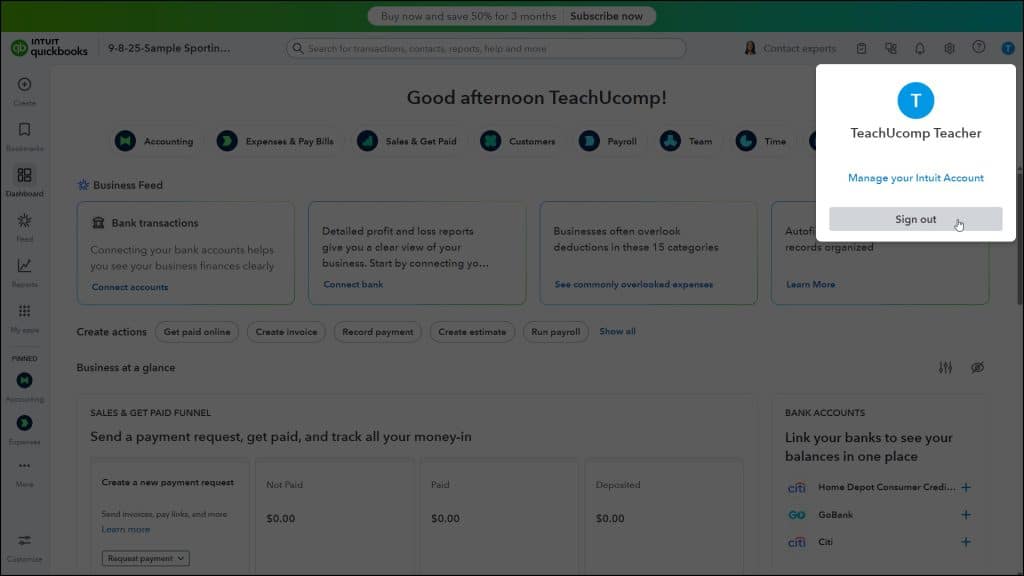
Alternatively, to sign out if you have multiple company files linked to your Intuit ID, click the “Sign in with a different account” link in the “Choose your company” page shown when you log in to QuickBooks Online.