MY CART
How to Switch Companies in QuickBooks Online
How to Switch Companies in QuickBooks Online: Video
This video lesson, titled “How to Switch Company Files in QuickBooks Online,” shows you how to switch companies in QuickBooks Online. This video lesson is from our complete QuickBooks Online tutorial, titled “Mastering QuickBooks Online Made Easy.”
Overview:
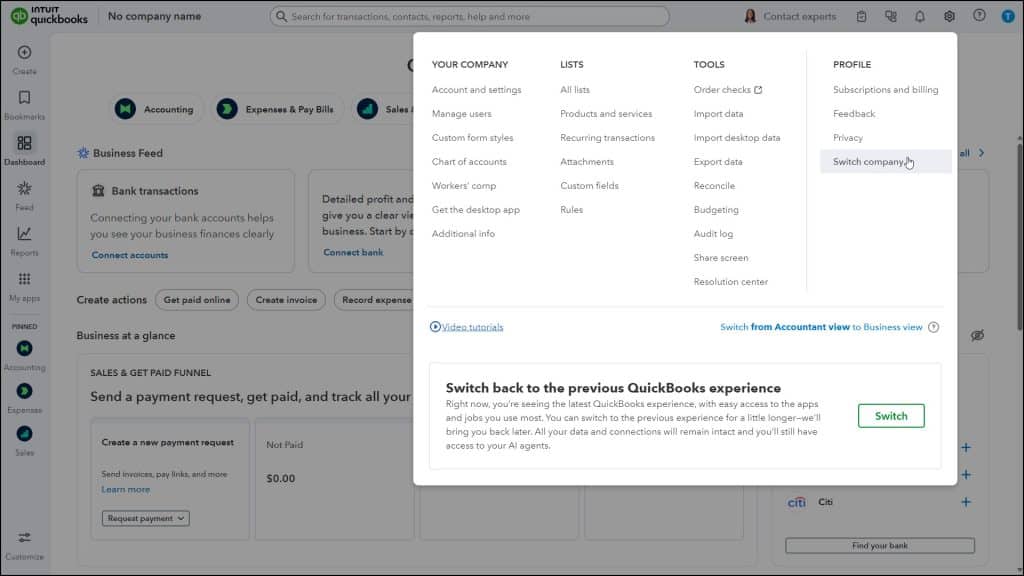
If you create multiple company files using the same Intuit ID in QuickBooks Online, you can easily switch between them. To switch companies in QuickBooks Online, click the “Settings” button in the QuickBooks Online toolbar. Then select the “Switch company” link in the drop-down menu under the “Profile” heading to open the “Choose your company” page that shows your company files. Then click the name of a company file to open its “Dashboard” page.