
TeachUcomp, Inc.

 MY CART
  • HOME
  • PRODUCTS
    • Books
      • QuickBooks Online
    • Manuals
      • Adobe
        • Acrobat
        • Lightroom Classic
        • Photoshop
        • Photoshop Elements
      • Crystal Reports
      • For Lawyers
        • Excel for Lawyers
        • Outlook for Lawyers
        • QuickBooks for Lawyers
        • Word for Lawyers
      • HTML
      • JavaScript
      • Microsoft Office
        • Access
        • Excel
        • OneNote
        • Outlook
        • Outlook on the Web
        • PowerPoint
        • Publisher
        • Word
      • Microsoft Project
      • Microsoft Teams
      • QuickBooks Online
      • QuickBooks Pro
      • Sage
        • Peachtree
        • Sage 50
      • SQL
      • Windows
    • Reference Guides
      • Adobe
        • Acrobat
        • Lightroom Classic
        • Photoshop
        • Photoshop Elements 2027
        • Photoshop Elements 2026
        • Photoshop Elements 2025
        • Photoshop Elements 2024
        • Photoshop Elements 2023
        • Photoshop Elements 2022
        • Photoshop Elements 2021
        • Photoshop Elements 2020
        • Photoshop Elements 2019
        • Photoshop Elements 2018
        • Photoshop Elements 15
      • Chrome OS
        • Chrome OS Keyboard Shortcuts
      • FreshBooks
      • Google
        • Google Classroom for Teachers
        • Google Docs
        • Google Drive
        • Google Forms
        • Google Sheets
        • Google Slides
      • macOS
        • macOS Keyboard Shortcuts
        • macOS Tahoe
      • Microsoft Office
        • Excel Formulas and Functions
        • Excel Keyboard Shortcuts (macOS)
        • Excel Keyboard Shortcuts (PC/Windows)
        • Excel Tables PivotTables and Charts
        • Microsoft 365
          • Access for Microsoft 365
          • Excel for Microsoft 365
          • Microsoft Office 365
          • Outlook for Microsoft 365 Classic Edition
          • Outlook for Microsoft 365 (New Outlook)
          • PowerPoint for Microsoft 365
          • Publisher for Microsoft 365
          • Word for Microsoft 365
        • Microsoft Office 2021
          • Access 2021
          • Excel 2021
          • Microsoft Office 2021
          • OneNote for Windows 10
          • Outlook 2021
          • PowerPoint 2021
          • Publisher 2021
          • Word 2021
        • Microsoft Office 2019
          • Access 2019
          • Excel 2019
          • Microsoft Office 2019
          • Outlook 2019
          • PowerPoint 2019
          • Publisher 2019
          • Word 2019
        • Microsoft Office 2016
          • Access 2016
          • Excel 2016
          • Microsoft Office 2016
          • OneNote 2016
          • Outlook 2016
          • PowerPoint 2016
          • Publisher 2016
          • Word 2016
        • Microsoft Office 2013
          • Excel 2013
          • Microsoft Office 2013
          • OneNote 2013
          • Outlook 2013
          • PowerPoint 2013
          • Word 2013
        • Microsoft Office for iPad
          • Microsoft Office for iPad
        • Word Keyboard Shortcuts (macOS)
        • Word Keyboard Shortcuts (PC/Windows)
      • Microsoft Teams
      • QuickBooks Online
      • QuickBooks Pro
        • QuickBooks Pro 2024
        • QuickBooks Pro 2023
        • QuickBooks Pro 2022
        • QuickBooks Pro 2021
        • QuickBooks Pro 2020
        • QuickBooks Pro 2019
        • QuickBooks Pro 2018
        • QuickBooks Pro 2017
        • QuickBooks Pro 2016
        • QuickBooks Pro 2015
        • QuickBooks Pro 2014
      • Sage 50 Accounting
      • SQL
      • Windows
        • Windows 11
        • Windows 11 and 10 Keyboard Shortcuts
        • Windows 10
    • Video Courses
      • All-Access Subscriptions
      • Course List
        • Accounting
        • Adobe
          • Acrobat
          • Lightroom Classic
          • Photoshop
          • Photoshop Elements
        • Crystal Reports
        • Employment Skills
          • Interview Skills
          • Resume Skills
        • For Lawyers
          • Excel for Lawyers
          • Outlook for Lawyers
          • QuickBooks for Lawyers
          • Word for Lawyers
        • HTML
        • JavaScript
        • Microsoft Office
          • Access
          • Excel
          • Microsoft Office Suite
          • OneNote
          • Outlook
          • Outlook on the Web
          • PowerPoint
          • Publisher
          • Word
        • Microsoft Project
        • Microsoft Teams
        • QuickBooks Online
        • QuickBooks Pro
        • Sage
          • Peachtree
          • Sage 50
        • SQL
        • Windows
      • My Courses
      • Video Course Options
    • Shortcut Stickers
      • Chrome OS
      • macOS
      • Microsoft Office
        • Word and Excel (Mac)
        • Word and Excel (PC/Windows)
      • QuickBooks Desktop
        • QuickBooks Desktop (PC/Windows) 2024
        • QuickBooks Desktop (PC/Windows) 2023
        • QuickBooks Desktop (PC/Windows) 2022-2015
      • QuickBooks Online
      • Windows
  • SHOP BY TOPIC
  • FOR TEAMS
  • SUPPORT
    • Company
      • About Us
      • Blog
      • Our History
      • Our Philosophy
        • Customer Service
        • Mission
      • Policies
      • Testimonials
    • Contact Us
    • FAQ
    • Help
    • Lost Password
    • Register a Product
  • LOGIN
    • Manage My Account
    • Member Login
    • My Courses
Shop Now

How to Manage Devices in Windows 11

Wednesday, October 28 2026 by Joseph Brownell
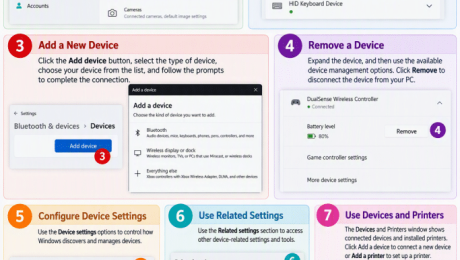
A picture showing how to manage devices in Windows 11.
How to Manage Devices in Windows 11: Video Lesson     This video lesson, titled “How to Manage Devices in Windows 11: A Windows 11 Training Tutorial,” shows you how to manage your connected devices in Windows 11. This video lesson is from our complete Windows tutorial, titled “Mastering Windows Made Easy.” Overview: How to
add deviceaudio devicesBluetooth and devicesBluetooth devicescomputer devicesconnected devicesconnected hardwaredevice connectionsdevice managementdevice settingshardware settingsinput devicesmanage Bluetooth devicesmanage connected devicesmanage devicesremove deviceteachucompWindows 11windows 11 tutorialWindows deviceswindows settingsWindows tipswindows trainingwireless devices
Read more
  • Published in Latest, Microsoft, Windows 11
No Comments

How to Add a Device in Windows 11

Tuesday, October 27 2026 by Joseph Brownell
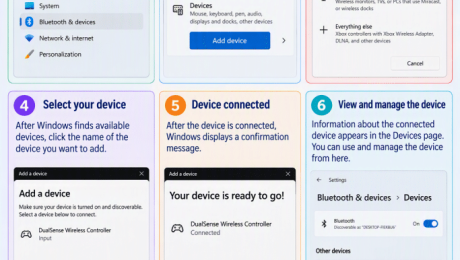
An infographic showing how to add a device in Windows 11.
How to Add a Device in Windows 11: Video Lesson     This video lesson, titled “How to Add a Device in Windows 11: A Windows 11 Training Tutorial,” shows you how to manually add a device in Windows 11. This video lesson is from our complete Windows tutorial, titled “Mastering Windows Made Easy.” Overview:
add a deviceadd Bluetooth deviceadding devicesBluetooth and devicesBluetooth devicesBluetooth tutorialconnect a deviceconnect headphonesconnect keyboardconnect mouseconnect speakersdevice connectiondevice setupgame controllerpair Bluetooth deviceteachucompWindows 11windows 11 tutorialWindows deviceswindows settingsWindows tipswindows trainingwireless deviceswireless displaywireless dock
Read more
  • Published in Latest, Microsoft, Windows 11
No Comments

How to Enable Bluetooth in Windows 11

Monday, October 26 2026 by Joseph Brownell
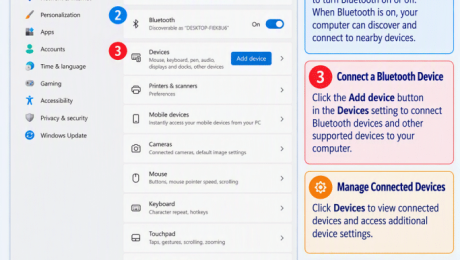
An infographic showing how to enable Bluetooth in Windows 11.
How to Enable Bluetooth in Windows 11: Video Lesson     This video lesson, titled “How to Enable Bluetooth in Windows 11: A Windows 11 Training Tutorial,” shows you how to enable or disable Bluetooth in Windows 11. This video lesson is from our complete Windows tutorial, titled “Mastering Windows Made Easy.” Overview: What Does
bluetoothBluetooth and devicesBluetooth connectionBluetooth devicesBluetooth headphonesBluetooth keyboardBluetooth mouseBluetooth settingsBluetooth tutorialconnect Bluetooth devicesdisable Bluetoothenable Bluetoothteachucompturn off Bluetoothturn on BluetoothWindows 11windows 11 tutorialWindows Bluetoothwindows settingsWindows tipswindows trainingwireless connectionwireless devices
Read more
  • Published in Latest, Microsoft, Windows 11
No Comments
Team Training. Solutions for all team sizes.


Categories

  • GET SOCIAL

© 2001-2026 Copyright TeachUcomp, Inc. All rights reserved.

TOP
25% Off Everything 3 Days 12 Hours 46 Minutes 53 Seconds      Coupon Code: SAVE25
Shop Now