
How to Change Folder Views within File Explorer in Windows 11
Friday, September 25 2026
by Joseph Brownell
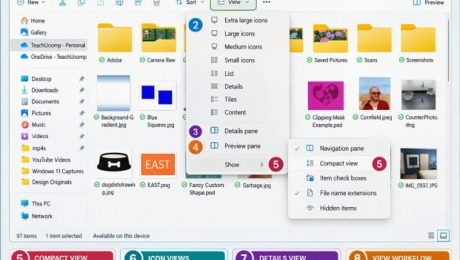
How to Change Folder Views within File Explorer in Windows 11: Video Lesson This video lesson, titled “How to Change Folder Views within File Explorer in Windows 11: A Windows 11 Training Tutorial,” shows you how to change the view of the current folder shown within File Explorer in Windows 11. This video
changing folder viewsCompact viewContent viewcustomize File ExplorerDetails paneDetails viewExtra large iconsfile explorerFile Explorer tutorialFile Explorer viewsfile organizationfolder views Windows 11Large iconsList viewPreview paneSmall iconsteachucompTiles viewWindows 11windows 11 tutorialWindows file managementWindows tipswindows training
- Published in Latest, Microsoft, Windows 11
No Comments
How to Reopen a Frequently Opened File or Folder in File Explorer in Windows 11
Thursday, September 24 2026
by Joseph Brownell
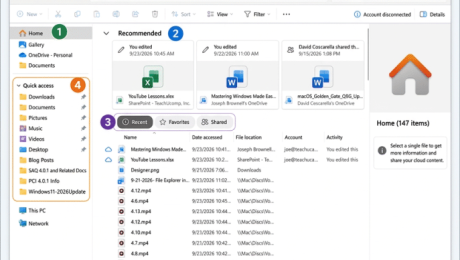
How to Reopen a Frequently Opened File or Folder in File Explorer in Windows 11: Video Lesson This video lesson, titled “How to Reopen a Frequently Opened File or Folder in File Explorer in Windows 11: A Training Tutorial,” shows you how to quickly find recently used files and folders in File Explorer
file explorerFile Explorer HomeFile Explorer home viewFile Explorer navigationFile Explorer tutorialfrequently used foldersopen recent documentspin to Quick Accesspinned foldersquick accessrecent files Windows 11recent itemsrecently opened filesreopen recent filesreopen recent foldersteachucompWindows 11windows 11 tutorialWindows courseWindows productivityWindows tipswindows training
- Published in Latest, Microsoft, Windows 11
How to Use the Home View of File Explorer in Windows 11
Wednesday, September 23 2026
by Joseph Brownell
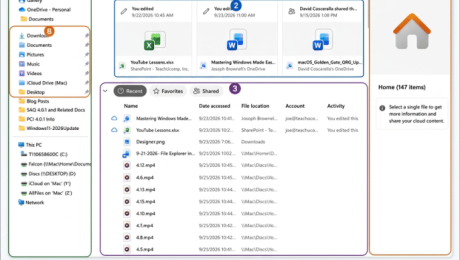
How to Use the Home View of File Explorer in Windows 11: Video Lesson This video lesson, titled “How to Use the Home View of File Explorer in Windows 11: A Windows 11 Training Tutorial,” shows you how to use the Home view of File Explorer in Windows 11. This video lesson is
beginner Windows 11browse recent filescomputer basicsfavorite files Windows 11File Explorer basicsFile Explorer Home Windows 11File Explorer tutorialfile management Windows 11file organizationfrequently used foldersHome view File Explorermicrosoft windows courseorganize files Windows 11Quick Access Windows 11recent documents Windows 11recent files Windows 11recommended files Windows 11teachucompWindows 11 File ExplorerWindows 11 Home viewwindows 11 trainingwindows 11 tutorialWindows folders and filesWindows productivity
- Published in Latest, Microsoft, Windows 11
How to Navigate Folders in File Explorer in Windows 11
Tuesday, September 22 2026
by Joseph Brownell
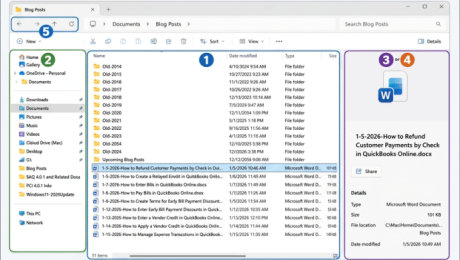
How to Navigate Folders in File Explorer in Windows 11: Video Lesson This video lesson, titled “How to Navigate Folders in Windows 11 Using File Explorer: A Windows 11 Training Tutorial,” shows you how to navigate folders in File Explorer in Windows 11. This video lesson is from our complete Windows tutorial, titled
Back button File Explorerbeginner Windows 11browse folders Windows 11computer basicsdetails pane Windows 11File Explorer basicsFile Explorer navigationFile Explorer tutorialfolder hierarchy Windows 11Forward button File Explorermanage files and foldersmicrosoft windows coursenavigate File Explorernavigate folders Windows 11navigation pane Windows 11open files Windows 11open folders Windows 11preview pane Windows 11teachucompUp button File ExplorerWindows 11 folderswindows 11 trainingwindows 11 tutorialWindows file management
- Published in Latest, Microsoft, Windows 11
File Explorer in Windows 11
Monday, September 21 2026
by Joseph Brownell
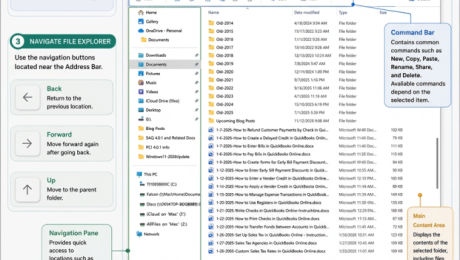
Learn about File Explorer in Windows 11: Video Lesson This video lesson, titled “Learn about File Explorer in Windows 11: A Windows 11 Training Tutorial,” shows you how to use File Explorer in Windows 11. This video lesson is from our complete Windows tutorial, titled “Mastering Windows Made Easy.” Overview: What Is File
address bar File Explorerbeginner Windows 11browse folders Windows 11command bar File Explorercomputer basicsFile Explorer interfaceFile Explorer tutorialFile Explorer Windows 11file manager Windows 11how to use File Explorermanage files Windows 11microsoft windows coursemicrosoft windows tutorialnavigate File Explorernavigation pane Windows 11teachucompwindows 11 basicsWindows 11 File ExplorerWindows 11 foldersWindows 11 productivitywindows 11 trainingWindows Explorer tutorialWindows file managementWindows folders and files
- Published in Latest, Microsoft, Windows 11
How to Use the Settings App in Windows 11
Friday, September 18 2026
by Joseph Brownell
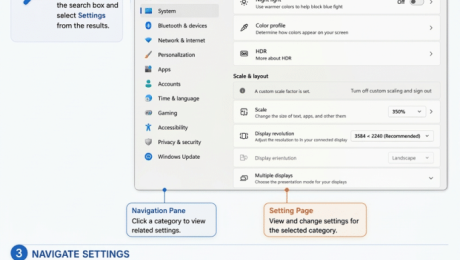
How to Use the Settings App in Windows 11: Video Lesson This video lesson, titled “How to Open the Settings App in Windows 11 to Find and Change Settings: A Training Tutorial,” shows you how to use the Settings app to find and change settings in Windows 11. This video lesson is from
access Settings Windows 11beginner Windows 11computer basicscustomize Windows 11Find a setting Windows 11manage Windows settingsmicrosoft windows coursemicrosoft windows tutorialnavigate Settings Windows 11open Settings Windows 11search Settings Windows 11Settings navigation panesystem settings Windows 11teachucompwindows 11 basicswindows 11 featuresWindows 11 SettingsWindows 11 settings tutorialwindows 11 trainingWindows configurationWindows preferencesWindows Settings appWindows settings categoriesWindows setup tutorial
- Published in Latest, Microsoft, Windows 11
How to Change Your PIN in Windows 11
Thursday, September 17 2026
by Joseph Brownell
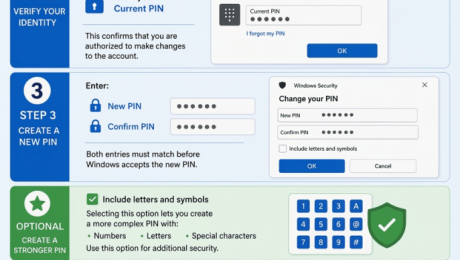
How to Change your PIN in Windows 11: Video Lesson This video lesson, titled “How to Change Your PIN in Windows 11: A Training Tutorial,” shows you how to change your PIN in Windows 11. This video lesson is from our complete Windows tutorial, titled “Mastering Windows Made Easy.” Overview: After creating a
account security Windows 11beginner Windows 11change PIN Windows 11computer security basicscreate PIN Windows 11how to change PIN Windows 11Microsoft account PINmicrosoft windows tutorialpasswordless sign inremove PIN Windows 11reset PIN Windows 11secure login Windows 11sign-in options Windows 11teachucompWindows 11 PINwindows 11 trainingwindows 11 tutorialWindows authenticationWindows Hello PINWindows Hello securityWindows Hello setupWindows security featuresWindows sign in PINWindows user account
- Published in Latest, Microsoft, Windows 11
Sign-in Options in Windows 11
Wednesday, September 16 2026
by Joseph Brownell
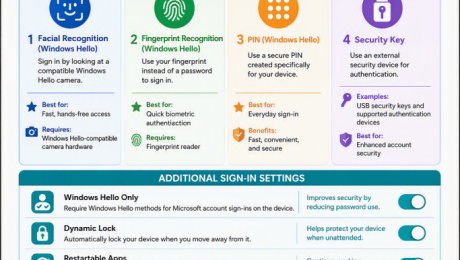
Learn about the Sign-in Options in Windows 11: Video Lesson This video lesson, titled “Learn about Sign in Options in Windows 11: A Training Tutorial,” shows you the different passwordless sign-in options in Windows 11. This video lesson is from our complete Windows tutorial, titled “Mastering Windows Made Easy.” Overview: Windows 11 provides
account protectionAccounts settings Windows 11beginner Windows 11biometric sign in Windows 11computer security basicsconfigure sign-in optionsfacial recognition Windows 11fingerprint sign in Windows 11microsoft account sign inmicrosoft windows coursepasswordless sign inPIN Windows Hellosecure login Windows 11security key Windows 11sign in Windows 11teachucompWindows 11 security featuresWindows 11 sign-in optionswindows 11 trainingwindows 11 tutorialWindows account securityWindows authenticationWindows HelloWindows Hello setup
- Published in Latest, Microsoft, Windows 11


