
TeachUcomp, Inc.

 MY CART
  • HOME
  • PRODUCTS
    • Books
      • QuickBooks Online
    • Manuals
      • Adobe
        • Acrobat
        • Lightroom Classic
        • Photoshop
        • Photoshop Elements
      • Crystal Reports
      • For Lawyers
        • Excel for Lawyers
        • Outlook for Lawyers
        • QuickBooks for Lawyers
        • Word for Lawyers
      • HTML
      • JavaScript
      • Microsoft Office
        • Access
        • Excel
        • OneNote
        • Outlook
        • Outlook on the Web
        • PowerPoint
        • Publisher
        • Word
      • Microsoft Project
      • Microsoft Teams
      • QuickBooks Online
      • QuickBooks Pro
      • Sage
        • Peachtree
        • Sage 50
      • SQL
      • Windows
    • Reference Guides
      • Adobe
        • Acrobat
        • Lightroom Classic
        • Photoshop
        • Photoshop Elements 2027
        • Photoshop Elements 2026
        • Photoshop Elements 2025
        • Photoshop Elements 2024
        • Photoshop Elements 2023
        • Photoshop Elements 2022
        • Photoshop Elements 2021
        • Photoshop Elements 2020
        • Photoshop Elements 2019
        • Photoshop Elements 2018
        • Photoshop Elements 15
      • Chrome OS
        • Chrome OS Keyboard Shortcuts
      • FreshBooks
      • Google
        • Google Classroom for Teachers
        • Google Docs
        • Google Drive
        • Google Forms
        • Google Sheets
        • Google Slides
      • macOS
        • macOS Keyboard Shortcuts
        • macOS Tahoe
      • Microsoft Office
        • Excel Formulas and Functions
        • Excel Keyboard Shortcuts (macOS)
        • Excel Keyboard Shortcuts (PC/Windows)
        • Excel Tables PivotTables and Charts
        • Microsoft 365
          • Access for Microsoft 365
          • Excel for Microsoft 365
          • Microsoft Office 365
          • Outlook for Microsoft 365 Classic Edition
          • Outlook for Microsoft 365 (New Outlook)
          • PowerPoint for Microsoft 365
          • Publisher for Microsoft 365
          • Word for Microsoft 365
        • Microsoft Office 2021
          • Access 2021
          • Excel 2021
          • Microsoft Office 2021
          • OneNote for Windows 10
          • Outlook 2021
          • PowerPoint 2021
          • Publisher 2021
          • Word 2021
        • Microsoft Office 2019
          • Access 2019
          • Excel 2019
          • Microsoft Office 2019
          • Outlook 2019
          • PowerPoint 2019
          • Publisher 2019
          • Word 2019
        • Microsoft Office 2016
          • Access 2016
          • Excel 2016
          • Microsoft Office 2016
          • OneNote 2016
          • Outlook 2016
          • PowerPoint 2016
          • Publisher 2016
          • Word 2016
        • Microsoft Office 2013
          • Excel 2013
          • Microsoft Office 2013
          • OneNote 2013
          • Outlook 2013
          • PowerPoint 2013
          • Word 2013
        • Microsoft Office for iPad
          • Microsoft Office for iPad
        • Word Keyboard Shortcuts (macOS)
        • Word Keyboard Shortcuts (PC/Windows)
      • Microsoft Teams
      • QuickBooks Online
      • QuickBooks Pro
        • QuickBooks Pro 2024
        • QuickBooks Pro 2023
        • QuickBooks Pro 2022
        • QuickBooks Pro 2021
        • QuickBooks Pro 2020
        • QuickBooks Pro 2019
        • QuickBooks Pro 2018
        • QuickBooks Pro 2017
        • QuickBooks Pro 2016
        • QuickBooks Pro 2015
        • QuickBooks Pro 2014
      • Sage 50 Accounting
      • SQL
      • Windows
        • Windows 11
        • Windows 11 and 10 Keyboard Shortcuts
        • Windows 10
    • Video Courses
      • All-Access Subscriptions
      • Course List
        • Accounting
        • Adobe
          • Acrobat
          • Lightroom Classic
          • Photoshop
          • Photoshop Elements
        • Crystal Reports
        • Employment Skills
          • Interview Skills
          • Resume Skills
        • For Lawyers
          • Excel for Lawyers
          • Outlook for Lawyers
          • QuickBooks for Lawyers
          • Word for Lawyers
        • HTML
        • JavaScript
        • Microsoft Office
          • Access
          • Excel
          • Microsoft Office Suite
          • OneNote
          • Outlook
          • Outlook on the Web
          • PowerPoint
          • Publisher
          • Word
        • Microsoft Project
        • Microsoft Teams
        • QuickBooks Online
        • QuickBooks Pro
        • Sage
          • Peachtree
          • Sage 50
        • SQL
        • Windows
      • My Courses
      • Video Course Options
    • Shortcut Stickers
      • Chrome OS
      • macOS
      • Microsoft Office
        • Word and Excel (Mac)
        • Word and Excel (PC/Windows)
      • QuickBooks Desktop
        • QuickBooks Desktop (PC/Windows) 2024
        • QuickBooks Desktop (PC/Windows) 2023
        • QuickBooks Desktop (PC/Windows) 2022-2015
      • QuickBooks Online
      • Windows
  • SHOP BY TOPIC
  • FOR TEAMS
  • SUPPORT
    • Company
      • About Us
      • Blog
      • Our History
      • Our Philosophy
        • Customer Service
        • Mission
      • Policies
      • Testimonials
    • Contact Us
    • FAQ
    • Help
    • Lost Password
    • Register a Product
  • LOGIN
    • Manage My Account
    • Member Login
    • My Courses
Shop Now
Joseph Brownell is founder and Vice President of TeachUcomp, Inc. He is the author of dozens of titles across the TeachUcomp, Inc. product line.

How to Use the Notification Center and Quick Settings in Windows 11

Wednesday, October 21 2026 by Joseph Brownell
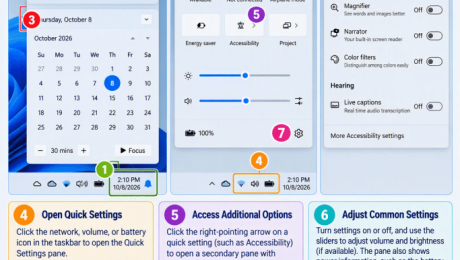
An infographic showing how to use the Notification Center and Quick Settings in Windows 11.
How to Use the Notification Center and Quick Settings in Windows 11: Video Lesson     This video lesson, titled “How to Use the Notification Center and Quick Settings in Windows 11: A Windows 11 Training Tutorial,” shows you how to use the Notification Center and how to change Quick Settings in Windows 11. This
action centerairplane modeBluetooth settingsbrightness controlsmanage notificationsNotification Centernotification panelnotification settingsproductivity tipsquick access settingsQuick SettingsQuick Settings menusystem traytaskbar settingsteachucompvolume controlsWi-Fi settingsWindows 11windows 11 tutorialWindows alertsWindows basicsWindows notificationsWindows tipswindows training
Read more
  • Published in Latest, Microsoft, Windows 11
No Comments

How to Change OneDrive Settings in Windows 11

Tuesday, October 20 2026 by Joseph Brownell
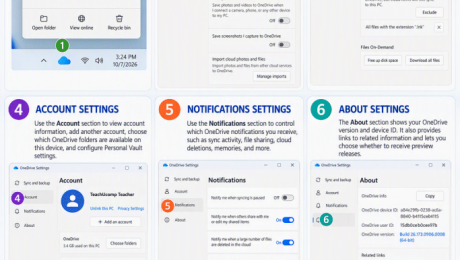
An infographic showing how to change OneDrive settings in Windows 11.
How to Change OneDrive Settings in Windows 11: Video Lesson     This video lesson, titled “How to Change OneDrive Settings in Windows 11: A Windows 11 Training Tutorial,” shows you how to change OneDrive settings in Windows 11. This video lesson is from our complete Windows tutorial, titled “Mastering Windows Made Easy.” Overview: How
backup fileschoose folderscloud backupcloud storagefile explorerfile synchronizationFiles On-DemandMicrosoft 365Microsoft OneDriveoffline filesOneDrive account settingsOneDrive configurationOneDrive foldersOneDrive settingsOneDrive setupOneDrive syncOneDrive tutorialonline filessync filesteachucompWindows 11windows 11 tutorialWindows tipswindows training
Read more
  • Published in Latest, Microsoft, Windows 11
No Comments

How to Use OneDrive Folders in File Explorer in Windows 11

Monday, October 19 2026 by Joseph Brownell
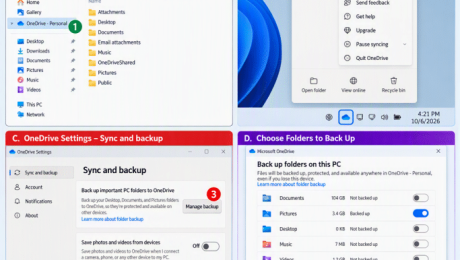
An infographic showing how to use OneDrive folders in File Explorer in Windows 11.
How to Use OneDrive Folders in File Explorer in Windows 11: Video Lesson     This video lesson, titled “How to Use OneDrive Folders within File Explorer in Windows 11: A Windows 11 Training Tutorial,” shows you how to use OneDrive folders in File Explorer in Windows 11. This video lesson is from our complete
access OneDrivebackup filescloud filescloud storagefile explorerFile Explorer tutorialfile managementfile synchronizationFiles On-DemandMicrosoft 365Microsoft OneDriveoffline filesOneDriveOneDrive filesOneDrive foldersOneDrive in File ExplorerOneDrive synconline filessync filesteachucompWindows 11windows 11 tutorialWindows tipswindows training
Read more
  • Published in Latest, Microsoft, Windows 11
No Comments

How to Manage the Computer and Drives in File Explorer in Windows 11

Friday, October 16 2026 by Joseph Brownell
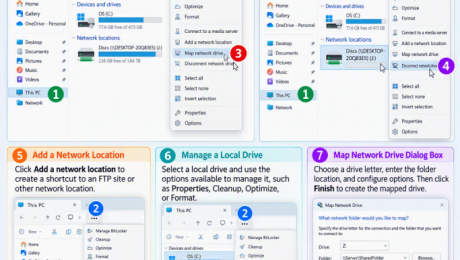
An infographic showing how to manage the computer and drives in File Explorer in Windows 11.
How to Manage the Computer and Drives in File Explorer in Windows 11: Video Lesson     This video lesson, titled “How to Manage the Computer and Drives in Windows 11: A Windows 11 Training Tutorial,” shows you how to manage your computer’s drives and storage locations in File Explorer in Windows 11. This video
C drivecomputer drivescomputer storagedisk drivesdisk spacedrive propertiesfile explorerFile Explorer drivesFile Explorer tutorialfree disk spacehard driveslocal diskmanage computer storagemanage drivesremovable drivesstorage drivesteachucompThis PCUSB drivesused disk spaceWindows 11windows 11 tutorialWindows file managementWindows storageWindows tipswindows training
Read more
  • Published in Latest, Microsoft, Windows 11
No Comments

How to Use Libraries in File Explorer in Windows 11

Thursday, October 15 2026 by Joseph Brownell
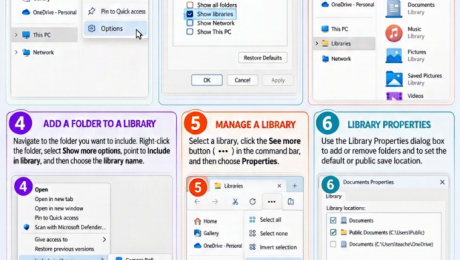
An infographic on how to use libraries in File Explorer in Windows 11.
How to Use Libraries in File Explorer in Windows 11: Video Lesson     This video lesson, titled “How to Manage Libraries in Windows 11: A Windows 11 Training Tutorial,” shows you how to use Libraries in File Explorer in Windows 11 to view the contents of multiple folders in a single window. This video lesson
create librarycustomize librariesDocuments libraryfile explorerFile Explorer librariesFile Explorer tutorialfile managementfolder managementlibrary folderslibrary locationsmanage librariesMusic libraryorganize filesorganize foldersPictures libraryteachucompVideos libraryWindows 11windows 11 tutorialWindows foldersWindows LibrariesWindows tipswindows training
Read more
  • Published in Latest, Microsoft, Windows 11
No Comments

How to Burn a CD or DVD in Windows 11

Wednesday, October 14 2026 by Joseph Brownell
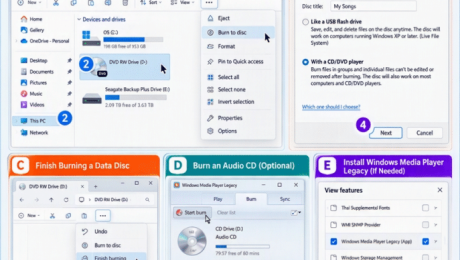
An infographic showing how to burn a CD or DVD in Windows 11.
How to Burn a CD or DVD in Windows 11: Video Lesson     This video lesson, titled “How to Burn a CD or DVD in Windows 11: A Windows 11 Training Tutorial,” shows you how to burn a CD or DVD in File Explorer in Windows 11. This video lesson is from our complete
audio CDbackup filesburn CDburn DVDburn files to discBurn to discburning discscreate CDcreate DVDdata discdisc burningfile explorerFile Explorer tutorialfile managementoptical driverecordable CDrecordable DVDremovable mediateachucomptransfer filesWindows 11windows 11 tutorialWindows Media Player LegacyWindows tipswindows training
Read more
  • Published in Latest, Microsoft, Windows 11
No Comments

How to Unzip Files in File Explorer in Windows 11

Tuesday, October 13 2026 by Joseph Brownell
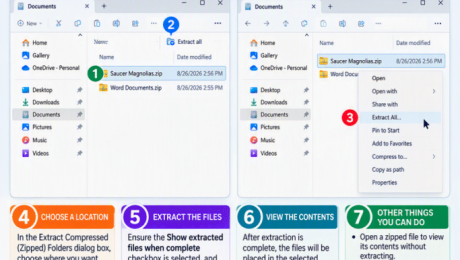
An infographic showing how to unzip files in File Explorer in Windows 11.
How to Unzip Files in File Explorer in Windows 11: Video Lesson     This video lesson, titled “How to Unzip Files within File Explorer in Windows 11: A Windows 11 Training Tutorial,” shows you how to unzip a zipped file within File Explorer in Windows 11. This video lesson is from our complete Windows
compressed filescompressed folderdecompressionextract filesextract foldersextract ZIP filefile explorerFile Explorer tutorialfile extractionfile managementfolder extractionopen zip fileopen zipped folderteachucompuncompress filesuncompress foldersunzip filesunzip foldersWindows 11windows 11 tutorialWindows tipswindows trainingZIP archivezip files
Read more
  • Published in Latest, Microsoft, Windows 11
No Comments

Photoshop Elements Cheat Sheet

Monday, October 12 2026 by Joseph Brownell
A picture of the first page of the
Photoshop Elements Cheat Sheet Now Available             TeachUcomp, Inc. is pleased to announce our Photoshop Elements cheat sheet, titled “Photoshop Elements 2027 Introduction Quick Reference Guide” is now available. Our Photoshop Elements 2027 quick reference card helps both creative professionals and novice users. This Photoshop Elements reference is a great tool for both students and
actionsbuycheat sheetcheat sheetshelpinfoinformationlearnnew productnewsphotoshop elementsphotoshop elements 2025photoshop elements cheat sheetproduct releasepurchasequick referencequick reference cardquick reference cardsreferencereference cardreference cardsreference guidetipstips and trickstraining materialtraining materialsuse
Read more
  • Published in Latest, Marketing, News, Photoshop Elements, What's New at TeachUcomp?
No Comments
  • 1
  • 2
  • 3
  • 4
  • 5
Team Training. Solutions for all team sizes.


Categories

  • GET SOCIAL

© 2001-2026 Copyright TeachUcomp, Inc. All rights reserved.

TOP
25% Off Everything 7 Days 10 Hours 1 Minutes 13 Seconds      Coupon Code: SAVE25
Shop Now