
How to Change the Display Settings in Windows 11
Thursday, November 05 2026
by Joseph Brownell
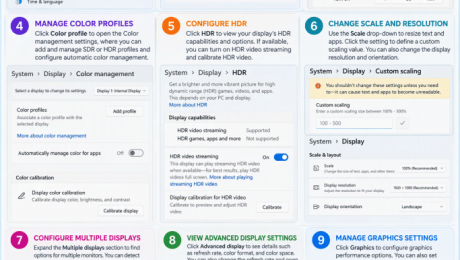
How to Change the Display Settings in Windows 11: Video Lesson This video lesson, titled “Windows 11 Display Settings Tutorial: Resolution, Scaling, and Multiple Monitors,” shows you how to change the Display settings in Windows 11. This video lesson is from our complete Windows tutorial, titled “Mastering Windows Made Easy.” Overview: How to
advanced displaycalibrate displaychange display settingscolor managementdisplay orientationdisplay resolutiondisplay scalingdisplay settingsHDR settingsmonitor configurationmonitor settingsmultiple displaysnight light settingsscale and layoutscreen brightnessscreen resolutionscreen settingssystem settingsteachucompWindows 11Windows 11 display settingswindows 11 tutorialwindows settingsWindows tipswindows training
- Published in Latest, Microsoft, Windows 11
No Comments
How to Use Registers in QuickBooks Online
Tuesday, January 20 2026
by Joseph Brownell
How to Use Registers in QuickBooks Online: Video This video lesson, titled “How to Use Registers in QuickBooks Online,” shows you how to manage account transactions by using account registers in QuickBooks Online. This video lesson is from our complete QuickBooks Online tutorial, titled “Mastering QuickBooks Online Made Easy.” Overview: QuickBooks Online Plus
account registersadd transactioncreatecreatingdeletedeleting transactionsdisplay optionsdisplay settingseditediting transactionsexportexport transactionsfilterfilter transactionshelphow to use registers in quickbooks onlinehow-toinstructionslearnlessonlistmanage transactionsnew transactionnew transactionsoverviewprint transactionsQuickBooks OnlineQuickBooks Online Plusreconcilereconcile accountregisterregisterssortsort transactionssortingswitch account registersteachtrainingtransactiontransactionstutorialvideoview a registerview registers
- Published in Latest, Quickbooks Online
How to Manage Expense Transactions in QuickBooks Online
Thursday, January 15 2026
by Joseph Brownell
How to Manage Expense Transactions in QuickBooks Online: Video This video lesson, titled “How to Manage Expense Transactions in QuickBooks Online,” shows you how to manage all the transactions related to your expenses in QuickBooks Online. This video lesson is from our complete QuickBooks Online tutorial, titled “Mastering QuickBooks Online Made Easy.” Overview: How
accounts payableactionactionsbatch actionsbill paymentsbillscheckscreatecreatingdeletedisplay optionsdisplay settingseditexpenseexpensesexportfilterhelphow-toinstructionslearnlessonlistmanage transactionsorder checksoverviewpay billspurchase ordersQuickBooks OnlineQuickBooks Online Plusteachtrainingtransactionstutorialvideo
- Published in Latest, Quickbooks Online
How to Use the Customers List in QuickBooks Online
Thursday, October 16 2025
by Joseph Brownell
How to Use the Customers List in QuickBooks Online: Video This video lesson, titled “How to Use the Customers Page and Customers List in QuickBooks Online,” shows you how to use the Customers list in QuickBooks Online. This video lesson is from our complete QuickBooks Online tutorial, titled “Mastering QuickBooks
actionsbatch actionscoursecustomercustomer actionscustomer datacustomer informationcustomer listcustomer managementcustomerscustomers listcustomers pagedisplay optionsdisplay settingsedit customersexport customersfind customersguidehelphowhow to use quickbookshow-toimport customersinactivate customersinstructionsintuitlearnLearn QuickBookslessonlistslists in quickbooks onlinemanage customers in quickbooks onlineonlineoverviewpagesprint customersqboquickbooksquickbooks for beginnersQuickBooks OnlineQuickBooks Online PlusQuickBooks trainingQuickBooks tutorialsoftwaresort customerstrainingtutorialvideo
- Published in Latest, Quickbooks Online
How to Use the Vendors List in QuickBooks Online
Thursday, October 16 2025
by Joseph Brownell
How to Use the Vendors List in QuickBooks Online: Video This video lesson, titled “How to Use the Vendors Page and Vendors List in QuickBooks Online,” shows you how to use the Vendors list in QuickBooks Online. This video lesson is from our complete QuickBooks Online tutorial, titled “Mastering QuickBooks
actionsbatch actionscoursedisplay optionsdisplay settingsedit vendorsexport vendorsfind vendorsguidehelphowhow to use quickbookshow-toinactivate vendorsinstructionsintuitlearnLearn QuickBookslessonlistslists in quickbooks onlinemanage vendors in quickbooks onlineonlineoverviewpagesprint vendorsqboquickbooksquickbooks for beginnersQuickBooks OnlineQuickBooks Online PlusQuickBooks trainingQuickBooks tutorialsoftwaresort vendorstrainingtutorialvendorvendor actionsvendor datavendor informationvendor listvendor managementvendorsvendors listvendors pagevideo
- Published in Latest, Quickbooks Online


