
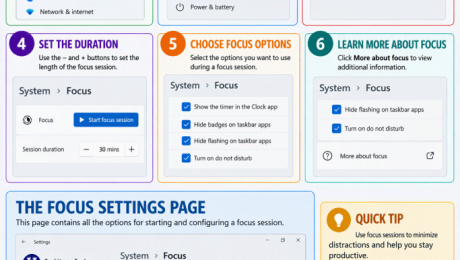
How to Change the Focus Settings in Windows 11
Tuesday, November 10 2026
by Joseph Brownell
How to Change the Focus Settings in Windows 11: Video Lesson This video lesson, titled “How to Change the Focus Settings in Windows 11: A Windows 11 Training Tutorial,” shows you how to change the Focus settings in Windows 11. This video lesson is from our complete Windows tutorial, titled “Mastering Windows Made
Clock appDo Not DisturbFocus modefocus sessionsFocus settingsfocus timerfocus timer Windows 11hide taskbar badgesmanage distractionsnotification settingsproductivity settingsproductivity tipsreduce distractionssession durationstart focus sessionsystem settingstaskbar flashingteachucompWindows 11windows 11 tutorialWindows FocusWindows productivitywindows settingsWindows tipswindows training
- Published in Latest, Microsoft, Windows 11
No Comments
How to Reopen a Frequently Opened File or Folder in File Explorer in Windows 11
Thursday, September 24 2026
by Joseph Brownell
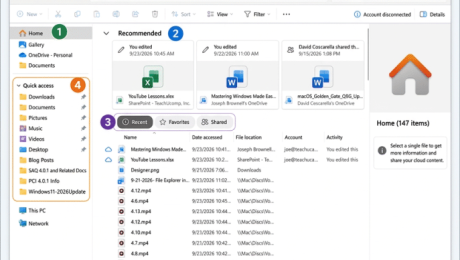
How to Reopen a Frequently Opened File or Folder in File Explorer in Windows 11: Video Lesson This video lesson, titled “How to Reopen a Frequently Opened File or Folder in File Explorer in Windows 11: A Training Tutorial,” shows you how to quickly find recently used files and folders in File Explorer
file explorerFile Explorer HomeFile Explorer home viewFile Explorer navigationFile Explorer tutorialfrequently used foldersopen recent documentspin to Quick Accesspinned foldersquick accessrecent files Windows 11recent itemsrecently opened filesreopen recent filesreopen recent foldersteachucompWindows 11windows 11 tutorialWindows courseWindows productivityWindows tipswindows training
- Published in Latest, Microsoft, Windows 11
How to Use the Home View of File Explorer in Windows 11
Wednesday, September 23 2026
by Joseph Brownell
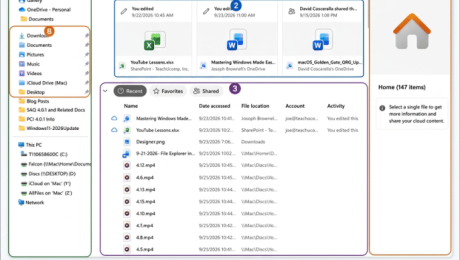
How to Use the Home View of File Explorer in Windows 11: Video Lesson This video lesson, titled “How to Use the Home View of File Explorer in Windows 11: A Windows 11 Training Tutorial,” shows you how to use the Home view of File Explorer in Windows 11. This video lesson is
beginner Windows 11browse recent filescomputer basicsfavorite files Windows 11File Explorer basicsFile Explorer Home Windows 11File Explorer tutorialfile management Windows 11file organizationfrequently used foldersHome view File Explorermicrosoft windows courseorganize files Windows 11Quick Access Windows 11recent documents Windows 11recent files Windows 11recommended files Windows 11teachucompWindows 11 File ExplorerWindows 11 Home viewwindows 11 trainingwindows 11 tutorialWindows folders and filesWindows productivity
- Published in Latest, Microsoft, Windows 11
How to Resize a Desktop Window in Windows 11
Monday, August 24 2026
by Joseph Brownell
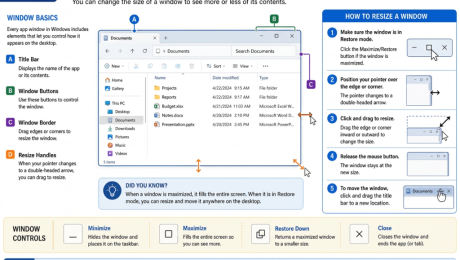
How to Resize a Desktop Window in Windows 11: Video Lesson This video lesson, titled “How to Use Windows 11 Apps and App Windows: A Windows 11 Training Tutorial,” shows you how to resize a desktop window in Windows 11. This video lesson is from our complete Windows tutorial, titled “Mastering Windows Made
app windows Windows 11beginner Windows 11desktop navigationdesktop window tutorialdrag window bordermaximize window Windows 11microsoft windows courseminimize windowresize app windowresize application windowresize window Windows 11restore down windowteachucomptitle bar controlswindow controlswindows 11 trainingWindows 11 window sizeWindows desktop basicsWindows productivitywindows tutorialWindows user guideworking with windows
- Published in Latest, Microsoft, Windows 11
How to Use Windows 11 Apps and App Windows
Friday, August 21 2026
by Joseph Brownell
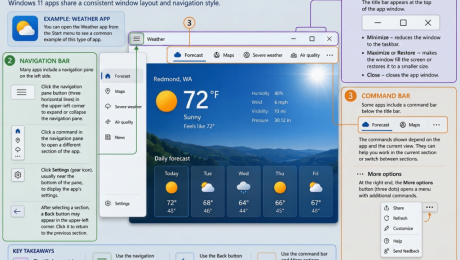
How to Use Windows 11 Apps and App Windows: Video Lesson This video lesson, titled “How to Use Windows 11 Apps and App Windows: A Windows 11 Training Tutorial,” shows you how to use Windows 11 apps and app windows. This video lesson is from our complete Windows tutorial, titled “Mastering Windows Made
app settingsback button Windows appsclose app windowcommand bardesktop applicationsmicrosoft windows courseminimize maximize restorenavigation paneteachucomptitle baruse Windows appsWeather app Windows 11Windows 11 app navigationWindows 11 appswindows 11 basicswindows 11 trainingWindows app interfaceWindows app windowWindows apps tutorialWindows productivityWindows Settings appwindows tutorial
- Published in Latest, Microsoft, Windows 11
How to Search in Windows 11
Thursday, August 20 2026
by Joseph Brownell
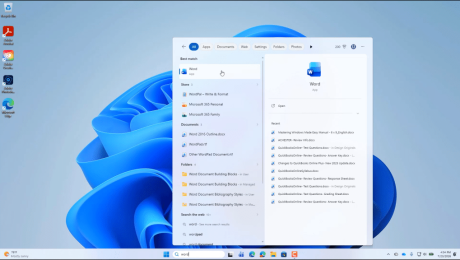
How to Search in Windows 11: Video Lesson This video lesson, titled “How to Search in Windows 11: Tips to Find Apps, Files, and Settings Fast! – A Training Tutorial,” shows you how to use the Search feature in Windows 11. This video lesson is from our complete Windows tutorial, titled “Mastering Windows
find apps in Windows 11find documentsfind files in Windows 11find folderslaunch apps from searchlearn windows 11locate programsSearch buttonsearch for settingssearch in Windows 11search resultswindows 11 basicswindows 11 beginner tutorialwindows 11 searchwindows 11 trainingWindows productivityWindows Search basicsWindows search boxWindows Search featuresWindows search filtersWindows Search tutorialWindows taskbar search
- Published in Latest, Microsoft, Windows 11


